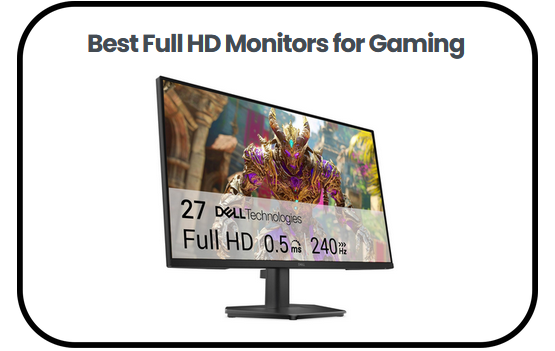
The best Full HD Monitors for Gaming have earned their reputation for good reason and after going through the top options available, I can tell you the performance they deliver goes far beyond what the price tag suggests.
These displays combine high refresh rates, fast response times and adaptive sync technology to create gameplay that feels smooth, controlled, and visually satisfying whether you are a casual player or someone who takes competition seriously.
In this guide, I will walk you through the standout features to look for, my top picks across different needs and budgets, a practical buying guide covering everything from panel types to connectivity and answers to the questions most buyers ask before making a decision.
Overview of the Best Full HD Monitors for Gaming:
- SANSUI 24 inch Computer Monitor — Best for Simple and Reliable Everyday Use
- Sceptre 22 Inch Full HD Gaming Monitor — Best Budget Pick
- ASUS 24 Inch 1080P Eye Care Monitor — Best for Eye Comfort
- KOORUI 27 Inch Gaming Monitor — Best Overall
- AOC 27 Inch QHD Gaming Monitor — Best Premium Option
- SANSUI 24 Inch Curved Gaming Monitor — Best Curved Display for Immersive Gaming
- Sceptre Curved 24 Inch Gaming Monitor — Best for Casual and Everyday Gaming
- Dell 27 Inch 240Hz Gaming Monitor — Best for High Speed Competitive Gaming
Best Full HD Monitors for Gaming
1. SANSUI 24 inch Computer Monitor
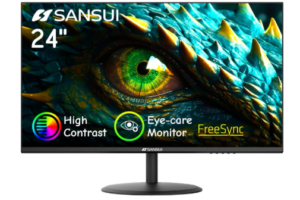
The SANSUI 24 inch Computer Monitor fits comfortably among the best Full HD Monitors for Gaming by focusing on simplicity and dependable everyday performance. It features a 24 inch display with a Full HD resolution of 1920 × 1080, delivering a clear and balanced picture that works well for both gaming and general use. The screen size feels just right for most setups, keeping everything within easy view without overwhelming your desk.
With 250 nits of brightness, the display performs well in standard indoor lighting. It may not be the brightest option available, but it keeps visuals visible and consistent during gameplay and daily tasks. The inclusion of FreeSync support helps reduce screen tearing, so motion appears smoother and more stable, especially during fast moving scenes.
Connectivity is straightforward and practical. It comes with HDMI 1.4 and VGA ports, making it compatible with both modern and older systems. An HDMI cable is also included, which makes the setup process quick and convenient. However, it does not include built in speakers or a headphone jack, so you will need external audio for a complete setup.
The design keeps things simple but functional. It supports tilt adjustment from negative 5 degrees to 22 degrees, allowing you to find a comfortable viewing angle during long sessions. The 178 degree viewing angles help maintain image quality even when viewed from different positions. It also supports 75 × 75 mm VESA mounting, giving you flexibility if you prefer a cleaner desk setup.
SANSUI also backs the monitor with a 30 day money back guarantee, free replacement service, and lifetime technical support. Overall, it delivers a smooth and reliable Full HD experience that focuses on essential features, even though the lack of built in audio may be a limitation for some users.
Pros
- FreeSync support reduces visible screen tearing during casual gameplay
- 24 inch size keeps the entire screen within easy view for focused gaming
- Includes HDMI cable, so no extra purchase is needed for setup
- 178 degree viewing angles maintain image clarity when viewed from the side
- Tilt range allows better positioning during long work or gaming sessions
Cons
- No built in speakers or headphone jack, so external audio is required
2. Sceptre 22 Inch Full HD Gaming Monitor
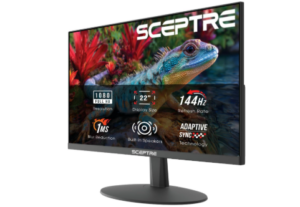
The Sceptre 22 Inch Gaming Monitor is designed for users who prefer a compact display that still delivers smooth performance during everyday gaming. It features a 22 inch Full HD screen with a resolution of 1920 × 1080, offering a clean and focused viewing experience. Its smaller footprint makes it especially suitable for tight desk setups, while still keeping gameplay easy to follow.
What gives this monitor an edge is its 144Hz refresh rate. Motion appears noticeably smoother, and fast scenes feel more controlled compared to standard displays. This makes a difference in action heavy games, where quick movements benefit from improved clarity and responsiveness.
When it comes to connectivity, the monitor includes both HDMI and VGA ports, making it easy to pair with a wide range of devices. Built in speakers are also included, providing a convenient audio solution without the need for additional equipment. While the sound output is fairly basic, it works well enough for casual gaming and everyday use.
Visually, the thin bezels help reduce distractions and keep your attention on the screen. It also features Blue Light Shift, which helps ease eye strain over longer sessions. This makes it more comfortable for users who spend extended hours gaming or working.
For users working with limited space or looking for a budget friendly setup, this monitor delivers a practical balance of performance and convenience. It may not offer advanced color depth or powerful audio, but it handles everyday gaming smoothly and reliably.
Pros
- 144Hz refresh rate improves motion clarity during gameplay
- Compact size works well for smaller desk setups
- Built in speakers provide convenient everyday audio
- Thin bezels help maintain focus on the display
- Blue light reduction supports longer comfortable use
Cons
- Small screen may feel limiting for multitasking
3. ASUS 24 Inch 1080P Eye Care Monitor
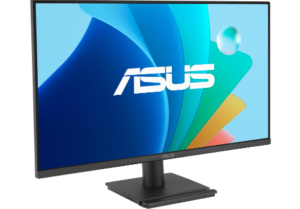
The ASUS 24 inch 1080P Eye Care Monitor earns its place among the best Full HD Monitors for Gaming by offering a smooth and comfortable viewing experience that works well across different uses. It features a 23.8 inch IPS display with a Full HD resolution of 1920 × 1080, delivering sharp visuals and consistent color from edge to edge. The frameless design also gives the screen a more open feel, helping you stay focused during gameplay or daily tasks.
Performance is steady and responsive, supported by a 120Hz SmoothMotion refresh rate and a 1ms MPRT response time. Fast moving scenes appear clearer, with less blur and better control, which makes gaming feel more fluid. Adaptive Sync helps maintain stability by reducing screen tearing, so motion stays consistent even during demanding moments.
Extended use feels easier on the eyes thanks to its TÜV Rheinland certified flicker free technology and low blue light settings. These features help reduce strain over time, making the monitor suitable for long gaming sessions, work hours, or streaming.
Connectivity is flexible, with HDMI, DisplayPort, VGA, and an earphone jack available. This makes it simple to switch between devices like PCs, laptops, and consoles without hassle. It also supports VESA mounting, allowing for a cleaner and more organized setup. ASUS DisplayWidget Center adds convenience by letting you adjust settings quickly without navigating physical buttons.
For users looking for a dependable balance between performance and comfort, this monitor delivers a consistent experience without unnecessary extras. It handles gaming, work, and everyday use with ease, making it a practical choice within this category.
Pros
- 120Hz refresh rate delivers smoother motion in games and videos
- 1ms MPRT reduces blur during fast action scenes
- IPS panel provides wide 178 degree viewing angles
- Multiple ports support easy connection to different devices
- Eye care features reduce strain during long use
- VESA mount support helps save desk space
Cons
- Built in speakers are not included
4. KOORUI 27 Inch Gaming Monitor
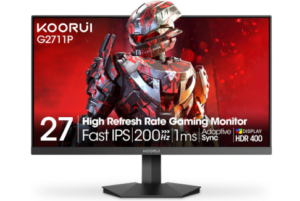
The KOORUI 27 inch Gaming Monitor is a strong option for users who want a larger display that enhances immersion during gaming and everyday use. It features a 27 inch Full HD IPS panel, giving you more screen space to take in the action while keeping visuals clear and well defined. The size alone adds a more engaging feel, especially when playing or watching content for longer periods.
Performance is where this monitor really makes an impact. With a 200Hz refresh rate and a 1ms MPRT response time, motion appears smooth and controlled even in fast paced scenes. This reduces blur and helps gameplay feel more responsive. Adaptive Sync support also helps minimize screen tearing and stuttering, creating a more stable experience during intense moments.
Visual quality remains impressive throughout. HDR400 support enhances contrast, while the 90 percent DCI P3 color gamut brings added richness and depth to colors. Combined with the IPS panel, the display maintains consistency even when viewed from different angles, making it reliable for both gaming and general use.
Among the best Full HD Monitors for Gaming, this model strikes a balance between screen size, speed, and visual performance without feeling overly complex. It manages to deliver a more immersive experience while still keeping things practical for everyday setups.
Connectivity includes HDMI 2.0 and DisplayPort 1.4, allowing easy connection to PCs and consoles. It also features low blue light mode and flicker free technology to support longer sessions with less strain. Tilt adjustment and VESA mount compatibility give you flexibility in positioning and setup.
Pros
- 200Hz refresh rate ensures very smooth gameplay
- 1ms response time reduces blur in fast action
- HDR400 improves contrast and visual depth
- Wide color gamut delivers vivid and accurate colors
- Multiple ports support PCs and consoles
- Eye care features reduce strain during long use
Cons
- Stand offers limited adjustment beyond tilt
5. AOC 27 Inch QHD Gaming Monitor
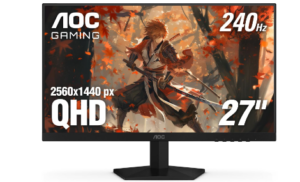
The AOC 27 Inch Gaming Monitor is designed for users who want sharper visuals and high speed performance in a single setup. It features a 27 inch IPS display with a 2560 × 1440 QHD resolution, delivering more detail and clarity compared to standard Full HD screens. This makes it a strong option for both gaming and everyday use, especially if you value image sharpness.
Performance is one of its biggest strengths. With a 240Hz refresh rate and a 0.3ms MPRT response time, motion feels extremely smooth and responsive. Fast scenes appear clearer with minimal blur, which can make a difference in competitive gaming where timing and precision matter. Adaptive Sync also helps maintain stability by reducing screen tearing and input lag.
Brightness reaches 300 nits, supported by a 1000 to 1 contrast ratio. This allows the display to handle both bright and darker scenes with better balance. Features like Shadow Control and Game Mode presets give you more control over how visuals appear, making it easier to adjust settings based on the type of game you are playing.
While it offers a higher resolution than most options in this category, it still finds relevance among the best Full HD Monitors for Gaming for users who are open to stepping slightly beyond Full HD for improved clarity without sacrificing speed. It delivers a similar experience, just with added detail.
Connectivity is flexible, with DisplayPort 1.4, two HDMI 2.0 ports, and an audio out port included. This makes it easy to connect multiple devices such as PCs and consoles. Tilt adjustment and VESA 100 × 100 mm support allow for better positioning or a cleaner desk setup, while the three sided frameless design helps reduce distractions around the screen.
Pros
- 240Hz refresh rate delivers very smooth gameplay
- 0.3ms response time keeps fast motion clear
- QHD resolution provides sharper image detail
- Adaptive Sync reduces tearing and stuttering
- Game tools improve in game visibility and control
- Multiple ports support flexible device setup
Cons
- No built in speakers included
6. SANSUI 24 Inch Curved Gaming Monitor
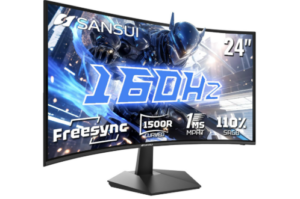
The SANSUI 24 inch Curved 160Hz Gaming Monitor is built for users who want a more engaging visual experience in a compact setup. It features a 24 inch 1500R curved Fast VA panel with Full HD resolution, creating a display that gently wraps into your field of view. This curvature adds a sense of depth that makes games feel more immersive and visually focused.
Performance is smooth and responsive, supported by a 160Hz refresh rate and a 1ms MPRT response time. Fast action stays clear with reduced blur, allowing movements to feel more controlled and precise. FreeSync support helps stabilize gameplay by minimizing screen tearing, especially during high intensity moments. Additional tools such as crosshair overlay, black level adjustment, and a built in timer offer practical support depending on the game being played.
Visual output is rich and well balanced. A 110 percent sRGB color range, combined with solid brightness and strong contrast levels, produces deep blacks and vibrant tones. HDR support further enhances detail in both bright and dark scenes, giving content a more dynamic appearance overall.
Connectivity is handled through HDMI 2.0 and DisplayPort 1.4, both capable of delivering the full refresh rate. It also includes an audio jack and VESA mounting support, giving room for different setup styles. The stand allows basic tilt adjustment, making it possible to fine tune viewing comfort even though movement options remain limited.
This monitor works especially well for users who want smooth gameplay combined with a curved display experience. It blends speed, visual depth, and practicality in a way that suits both casual and more focused gaming sessions.
Pros
- 160Hz refresh rate delivers smooth gameplay
- 1ms response time reduces motion blur
- Curved design improves immersion and focus
- Strong contrast produces deep and clear visuals
- Wide color gamut gives rich and vivid colors
- Gaming tools improve in game control
Cons
- Viewing angles are more limited than IPS panels
7. Sceptre Curved 24 Inch Gaming Monitor
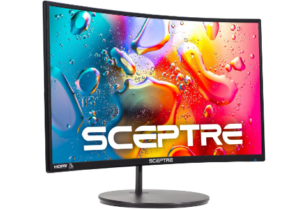
The Sceptre Curved 24 inch Gaming Monitor is designed to deliver an immersive viewing experience in a compact size. It features an 1800R curved 24 inch Full HD display with a resolution of 1920 × 1080, so visuals feel more engaging and naturally wrap into your field of view. This curved design helps improve focus during gaming and everyday use, especially for users who want a more immersive setup.
It supports a refresh rate of up to 75Hz, which provides smoother motion compared to standard 60Hz screens. While it is not aimed at competitive esports gaming, it still delivers stable performance for casual play and daily tasks. The high 3000:1 contrast ratio improves depth in darker scenes, so details in shadows and highlights appear clearer.
For connectivity, it includes HDMI, VGA, and PC audio input ports, making it easy to connect to a wide range of devices such as PCs and gaming consoles. It is also compatible with Windows 10 systems, which makes setup quick and straightforward. The 250 cd/m² brightness level works well in indoor environments, although performance is best in controlled lighting.
The design features a sleek metal finish and supports VESA wall mounting, which helps save desk space and allows more flexible setups. It also has a lamp life of over 30,000 hours, making it reliable for long term use. However, the 75Hz refresh rate limits its performance for fast paced competitive gaming.
Overall, this monitor fits well within the category of best Full HD Monitors for Gaming, especially for users who want a curved display experience at an affordable level. It focuses on immersion, design, and everyday usability rather than high end competitive performance.
Pros
- 1800R curve improves immersion during gaming and media use
- Multiple ports support wide device compatibility
- VESA mount option helps save desk space
- Sleek metal design gives a modern look
- Reliable for casual gaming and daily use
Cons
- 75Hz refresh rate limits competitive gaming performance
8. Dell 27 Inch 240Hz Gaming Monitor
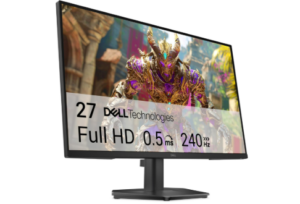
The best Full HD Monitors for Gaming lineup would feel incomplete without a display like the Dell 27 Inch 240Hz Gaming Monitor, which is clearly built for users who value speed, clarity, and consistent performance on a larger screen. It features a 27 inch Full HD Fast IPS panel that keeps visuals sharp while maintaining accurate color reproduction across wide viewing angles, making it equally reliable for gaming, streaming, and everyday use.
Where this monitor really separates itself is in motion handling. A 240Hz refresh rate combined with a 0.5ms response time creates a level of fluidity that feels immediate and precise. Fast moving scenes stay controlled rather than chaotic, with blur kept to a minimum even during intense gameplay. FreeSync Premium alongside HDMI VRR works quietly in the background, helping to smooth out frame inconsistencies and reduce screen tearing.
Color performance is handled with restraint and accuracy rather than exaggeration. With 99 percent sRGB coverage, images look natural, balanced, and detailed without drifting into oversaturation. At the same time, TÜV Rheinland certified eye comfort tuning reduces strain by limiting blue light exposure while preserving visual integrity, which becomes noticeable during extended sessions.
On the connectivity side, the monitor includes dual HDMI ports, DisplayPort 1.4, and a headphone output, allowing smooth switching between multiple devices such as PCs and consoles. Full 240Hz output is supported across compatible connections, ensuring the hardware is fully utilized when paired correctly.
Overall, this display leans heavily into performance consistency and visual stability. It suits users who want high refresh gaming without compromising everyday usability, especially on a larger screen that still feels controlled and practical.
Pros
- 240Hz refresh rate delivers very smooth gameplay
- 0.5ms response time reduces motion blur
- FreeSync Premium and VRR reduce screen tearing
- 99% sRGB provides accurate and vivid colors
- Eye comfort certification helps reduce eye strain
- Multiple ports support flexible device setups
Cons
- High performance needs strong hardware to fully benefit
Read more: 8 Best Full HD Monitors
Advantages of Using Full HD Monitors for Gaming
Smooth and Responsive Gameplay Experience
One of the biggest advantages of using the best Full HD Monitors for Gaming is how smoothly they handle motion. Higher refresh rates and faster response times reduce blur and lag during fast action scenes. As a result, movements feel more controlled and immediate, especially in competitive games where timing matters. This creates a more fluid experience that helps players react faster and stay fully engaged in the action.
Balanced Visual Clarity for Everyday Use
Full HD resolution offers a strong balance between sharpness and performance. It delivers clear and detailed images without demanding extremely powerful hardware, which makes it ideal for a wide range of users. Whether you are gaming, watching videos, or working, the visuals remain clean and easy to follow. This balance ensures consistent performance without unnecessary strain on your system.
Wide Range of Affordable Options
Another key benefit is accessibility. The market offers many models at different price points, making it easy to find something that fits both budget and performance needs. From entry level screens to high refresh rate gaming displays, users can choose based on preference without overspending. This flexibility makes it easier for gamers to upgrade their setup without financial pressure.
Better Compatibility with Mid Range Systems
Full HD monitors pair well with mid range graphics cards and processors, allowing users to achieve stable performance without needing top tier hardware. This means smoother frame rates and fewer performance drops during gameplay. It also makes system building or upgrading more practical, since users do not need to invest heavily in high end components to enjoy a good gaming experience.
Improved Comfort for Long Sessions
Eye comfort features such as blue light reduction and flicker free technology are commonly found in modern gaming monitors. These help reduce strain during extended use, making long gaming or work sessions more comfortable. Over time, this can make a noticeable difference in reducing fatigue, especially for users who spend many hours in front of a screen.
Flexible Design and Setup Options
Many monitors in this category come with adjustable stands, VESA mounting support, and slim bezel designs. This allows users to customize their setup based on space and preference. Whether you prefer a clean desk setup or a multi monitor arrangement, these design features make it easier to create a comfortable and organized workspace.
Strong Value for Gaming Performance
Overall, the best Full HD Monitors for Gaming deliver strong performance without unnecessary complexity. They combine smooth motion, decent color quality, and practical features that suit both casual and competitive players. This makes them a reliable choice for users who want a solid gaming experience without stepping into higher resolution costs or demanding system requirements.
Factors to Consider when Selecting the Best Full HD Monitors for Gaming
Refresh Rate Performance
One of the most important factors when choosing a gaming monitor is refresh rate performance. A higher refresh rate allows the screen to update more times per second, resulting in smoother motion during gameplay. This becomes especially noticeable in fast paced games where quick movements and reactions are essential. A lower refresh rate may still work for casual use, but it can feel less fluid when action becomes intense, so prioritizing a higher value improves overall gaming responsiveness.
Response Time Speed
Response time plays a key role in how clearly motion is displayed on the screen. It determines how quickly pixels change from one color to another, which directly affects motion blur. A faster response time helps keep fast moving scenes sharp and reduces ghosting effects. This is particularly useful in competitive gaming where visual clarity can influence reaction speed and accuracy during gameplay.
Display Resolution and Sharpness
Resolution affects how detailed and clear the image appears during use. Full HD resolution offers a balanced level of sharpness that works well for most gaming setups without requiring extremely powerful hardware. It provides clean visuals that are easy to follow, making it suitable for both gaming and everyday tasks. While higher resolutions exist, Full HD remains a practical choice for smooth performance and accessibility.
Panel Type and Viewing Experience
The type of display panel used has a direct impact on color accuracy, contrast, and viewing angles. IPS panels are known for consistent colors and wide viewing angles, while VA panels often deliver stronger contrast and deeper blacks. Choosing the right panel type depends on whether the user values vibrant color consistency or deeper visual depth. This factor influences how immersive and comfortable the gaming experience feels overall.
Adaptive Sync Technology
Adaptive sync technology helps create smoother gameplay by reducing screen tearing and stuttering. It works by synchronizing the monitor’s refresh rate with the frame output of the graphics card. This results in a more stable visual experience, especially during fast action scenes. It also helps maintain consistency in performance, making gameplay feel more polished and responsive.
Eye Comfort Features
Long gaming sessions can lead to eye strain, which makes comfort features an important consideration. Technologies such as low blue light modes and flicker free backlighting help reduce visual fatigue over time. These features make extended use more comfortable, especially for users who spend many hours in front of a screen for gaming, work, or entertainment. This improves overall usability and long term viewing comfort.
Connectivity Options
Connectivity determines how easily a monitor can work with different devices. HDMI, DisplayPort, and audio ports allow users to connect gaming consoles, PCs, and accessories without limitations. Having multiple input options also adds flexibility for switching between devices. This factor ensures that the monitor integrates smoothly into different setups without requiring additional adapters or complicated configurations.
Design, Size and Ergonomics
The physical design of a monitor influences both comfort and setup flexibility. Screen size affects immersion and desk space usage, while features like tilt adjustment and VESA mounting allow better positioning. Slim bezels can enhance focus by reducing distractions around the screen. A well designed monitor setup not only improves visual experience but also supports better posture and long term comfort during use.
Best Full HD Monitors for Gaming FAQs
What makes a monitor suitable for gaming?
A gaming monitor needs to balance smooth motion, clear visuals, and responsive performance. High refresh rates and fast response times are especially important because they reduce lag and motion blur during fast paced gameplay. Features like adaptive sync also help stabilize the image by reducing screen tearing. Together, these elements create a more fluid and enjoyable gaming experience across different game genres.
Is Full HD resolution good enough for gaming?
Full HD resolution is more than sufficient for most gaming setups, especially for users who prioritize performance and affordability. It delivers clear and sharp visuals without placing heavy demands on the graphics system, which helps maintain smoother frame rates. This makes it ideal for competitive gaming as well as everyday use. Many gamers prefer it because it strikes a practical balance between quality and performance.
What refresh rate is best for smooth gameplay?
A higher refresh rate generally results in smoother motion and better responsiveness during gaming. While standard displays may offer acceptable performance for casual use, higher refresh rates significantly improve clarity in fast moving scenes. This becomes especially important in action focused or competitive games where quick reactions matter. The smoother experience can also reduce eye fatigue during longer sessions.
What should you look for when choosing the Best Full HD Monitors for Gaming?
When choosing the best Full HD Monitors for Gaming, it is important to consider a combination of performance and comfort features. Key factors include refresh rate, response time, panel type, and adaptive sync support, all of which influence how smooth and clear gameplay feels. It is also worth checking eye comfort technologies, connectivity options, and ergonomic design features. Together, these elements ensure the monitor fits both gaming needs and everyday usability.
Conclusion
Choosing the best Full HD Monitors for Gaming does not have to be overwhelming and everything covered in this guide proves that the right display is well within reach regardless of your budget or setup. What stands out across every option reviewed here is how well these displays balance smooth motion, visual clarity, and practical features that hold up across both casual and competitive play.
From fast refresh rates and responsive panels to eye comfort technology and flexible connectivity, each monitor brings something meaningful to the table without overcomplicating the decision. Whether you are building your first setup or upgrading an existing one, Full HD remains a reliable and practical foundation that pairs well with a wide range of systems and budgets.
The right monitor does not just display your game, it shapes how you experience it and any of the options covered here are more than capable of doing exactly that.