
The best Curved Gaming Monitors under $500 offer a strong balance of immersive visuals, smooth performance and everyday practicality without pushing into premium pricing. I have spent time evaluating what really matters in this category and these monitors consistently deliver wider viewing angles, better comfort during long sessions, and responsive gameplay that suits a range of users and setups.
In this review I will break down the key features that influence performance, highlight the top options worth considering, walk through how to choose the right monitor for your needs and answer common questions so you can make a confident and informed decision.
Quick Overview of the Best Curved Gaming Monitors under $500:
- AOC Agon PRO 27″ QD OLED Gaming Monitor – Best Overall
- KTC 32 Inch 4K Gaming Monitor – Best for 4K Clarity
- Deco Gear 39″ Curved Widescreen Monitor – Best for Immersive Large Screen Experience
- Gawfolk 49 Inch Curved Gaming Monitor – Best Ultrawide for Productivity and Gaming
- INNOCN 45C1R 45 Inch Curved Gaming Monitor – Best for Multitasking and Workspace Efficiency
Best Curved Gaming Monitors under $500
1. AOC Agon PRO 27” QD OLED Gaming Monitor
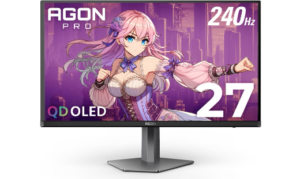
The AOC Agon PRO 27 inch QD OLED Gaming Monitor is built for gamers who want a serious mix of speed, clarity, and immersive visuals without going into extreme price territory. It sits comfortably in the conversation for the best Curved Gaming Monitors under $500 thanks to its blend of esports level responsiveness and premium OLED picture quality.
The display is powered by a state of the art QD OLED panel that makes visuals feel strikingly alive. Blacks appear deep and consistent, while colors come through with strong accuracy and vibrancy supported by over 1.07 billion colors. The 2K Quad HD resolution at 2560 by 1440 adds sharpness that keeps details clear in both fast action gameplay and visually rich environments. HDR10 support further enhances contrast and color depth, giving scenes more realism and a stronger sense of dimension during gameplay.
Performance is where this monitor becomes highly competitive. A 240Hz refresh rate paired with a 0.03ms GTG response time creates extremely smooth motion handling, especially in fast paced gaming genres. Movement feels immediate and fluid, helping reduce blur during quick transitions. G Sync support also helps maintain stable visuals by minimizing tearing, allowing gameplay to stay consistent even under heavy load.
It also adapts well for console gamers, supporting up to 120Hz depending on the system. This makes it versatile for players who switch between PC and console setups. Built in gaming modes and Shadow Control settings allow users to adjust visibility and optimize scenes for different types of games, improving both competitive awareness and visual comfort.
Design wise, the monitor includes rear lighting that adds a subtle ambient glow to gaming setups. While not directly tied to performance, it enhances the overall atmosphere and gives users more control over their setup aesthetics.
Pros
- Extremely fast 240Hz refresh rate for smooth gameplay
- Ultra low 0.03ms response time reduces motion blur
- QD OLED panel delivers deep blacks and vibrant colors
- 2K Quad HD resolution provides sharp and detailed visuals
- G Sync support ensures tear free and stable performance
- Strong HDR10 support improves contrast and realism
Cons
- OLED panel requires care to avoid long term image retention
2. KTC 32 Inch 4K Gaming Monitor
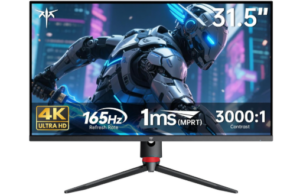
The KTC 32 Inch 4K Gaming Monitor is built for gamers who want a large immersive display with sharp detail and strong performance at an accessible price point. It combines high resolution clarity with smooth refresh performance, making it suitable for both cinematic gaming and competitive play.
This monitor features a 32 inch 4K UHD display powered by a fast IPS panel that delivers crisp and detailed visuals across every frame. The 3840 by 2160 resolution brings out fine textures in games and creates a clearer overall image experience. Color performance is strong with 121 percent sRGB coverage and support for 1.07 billion colors, producing rich and vibrant visuals that feel balanced and natural. The contrast ratio of 3000 to 1 improves depth in darker scenes while keeping bright areas visible and well defined.
Performance is where this display becomes especially effective for gaming. The 165Hz refresh rate ensures smooth motion during fast paced gameplay, while the 1ms response time reduces delay and motion blur. Combined with Adaptive Sync technology, the monitor minimizes screen tearing and stuttering so gameplay remains stable even when frame rates fluctuate. This level of responsiveness helps maintain a consistent and fluid experience in competitive gaming situations.
The KTC 32 Inch 4K Gaming Monitor fits well within the best Curved Gaming Monitors under $500 category due to its combination of resolution, speed, and visual quality. It offers a balance between high end clarity and gaming performance, making it appealing for users who want both immersion and responsiveness without moving into premium pricing tiers.
Connectivity is also flexible, with HDMI 2.1 and DisplayPort 1.4 support allowing compatibility with modern gaming PCs and next generation consoles. This makes it easy to switch between different devices depending on your setup. Wall mounting support adds further flexibility for users who want to optimize their desk or gaming space layout.
Comfort features are included to support longer sessions without strain. Flicker free technology and a low blue light mode help reduce eye fatigue during extended use, making the monitor suitable for both gaming and productivity over long periods.
Pros
- 4K UHD resolution delivers sharp and highly detailed visuals
- Fast IPS panel ensures accurate and vibrant color reproduction
- 165Hz refresh rate supports smooth and fluid gameplay
- 1ms response time improves competitive responsiveness
- Adaptive Sync reduces screen tearing and stuttering
- Wide color gamut enhances overall visual richness
Cons
- 4K resolution requires a powerful GPU for best performance
- No built in speakers included
3. Deco Gear 39” Curved Widescreen Monitor
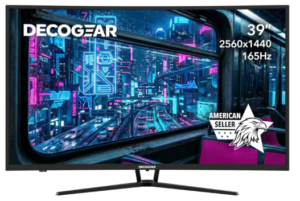
The Deco Gear 39 inch Curved Widescreen Gaming Monitor is built for users who want a large and immersive display for both gaming and everyday use. It creates a wide viewing space that feels more engaging and comfortable during long sessions.
The 3000R curved design helps improve viewing comfort. It reduces constant eye movement from side to side, which makes long use less tiring. The curve also makes the screen feel more immersive, especially in games and cinematic content.
Color performance is strong and visually appealing. The monitor supports 16.7 million colors with 99 percent sRGB accuracy. This produces balanced and vibrant visuals that work well for both gaming and creative tasks. The 4000 to 1 contrast ratio improves image depth by making dark areas richer and bright areas clearer. E LED lighting helps keep brightness even across the screen.
Gaming performance is smooth and responsive. The 165Hz refresh rate allows motion to feel fluid during fast gameplay. The 1 millisecond MPRT response time helps reduce blur when action becomes intense. Adaptive Sync keeps visuals stable by matching the monitor with the graphics card, which reduces screen tearing during gameplay.
The monitor also offers flexible connection options. HDMI 2.0 supports up to 144Hz while DisplayPort 1.4 allows full 165Hz performance. It also includes anti glare treatment that helps reduce reflections in bright rooms. VESA mount support allows users to adjust their setup for better comfort and space management.
The Deco Gear 39 inch Curved Widescreen Gaming Monitor fits well in the best Curved Gaming Monitors under $500 category because it delivers a mix of immersive size, smooth performance, and reliable color quality. It works well for users who want a balance between gaming and productivity in one display.
Pros
- Large 39 inch curved display improves immersion
- 3000R curvature reduces eye movement and strain
- 165Hz refresh rate delivers smooth gameplay
- 1ms response time improves fast action clarity
- 99 percent sRGB color accuracy produces vivid visuals
- Strong 4000 to 1 contrast ratio enhances depth
- Flexible connectivity with HDMI and DisplayPort
Cons
- Requires strong GPU for best high refresh performance
4. Gawfolk 49 Inch Curved Gaming Monitor
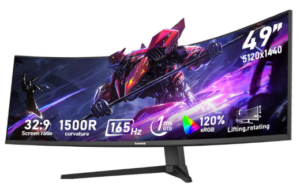
The Gawfolk 49 inch Ultra Wide Curved Gaming Computer Monitor is built for users who want an expansive viewing experience that combines productivity, entertainment, and gaming in one display. Its massive ultra wide design creates a panoramic field of view that feels far more immersive than standard monitors, making it a strong contender in the best Curved Gaming Monitors under $500 category.
This monitor features a 49 inch display with a 32:9 ultra wide aspect ratio and DQHD resolution of 5120 by 1440. This combination delivers a wide and detailed workspace that allows multiple applications to run side by side without feeling cramped. It is especially useful for multitasking, content creation, and productivity focused workflows where screen space matters. The extended horizontal view also enhances immersion in gaming and media, giving a more cinematic feel compared to traditional displays.
Visual performance is designed to support both creative work and entertainment. The monitor offers 120 percent sRGB color gamut coverage, which improves color richness and accuracy for tasks like photo editing and video grading. A 3000 to 1 contrast ratio enhances image depth by making dark areas more detailed while keeping bright areas clean and controlled. With 330cd per square meter brightness, the display maintains clear visibility across different lighting conditions, helping preserve detail in both shadows and highlights.
Gaming performance is smooth and responsive thanks to a 165Hz refresh rate paired with Adaptive Sync technology. This combination reduces screen tearing and motion blur, ensuring fluid movement during fast paced gameplay. Whether handling AAA games, dynamic visuals, or fast moving scenes, the monitor maintains a stable and responsive experience that supports both casual and competitive gaming.
Connectivity is well equipped for multi device use. With two HDMI 2.1 ports and two DisplayPort 1.4 inputs, the monitor supports high resolution and high refresh rate performance across multiple devices. This allows easy switching between a PC, gaming consoles like PS5 or Xbox Series X, and laptops without constant cable changes. It is designed for users who want a flexible and efficient multi device setup.
Comfort and usability are also considered in the design. The monitor supports height adjustment of up to 16cm along with rotation options, allowing users to find a comfortable viewing position for long sessions. A built in RGB ambient lighting system adds customizable lighting effects that enhance the overall setup atmosphere. It also includes low blue light technology and a flicker free display to help reduce eye strain during extended use, making it more suitable for long gaming or work sessions.
Pros
- 32:9 aspect ratio provides extensive screen space for productivity
- 165Hz refresh rate ensures smooth gaming performance
- Adaptive Sync reduces screen tearing and motion blur
- 120 percent sRGB delivers vibrant and accurate colors
- Strong contrast ratio enhances depth and visual clarity
- HDMI 2.1 and DisplayPort support multiple modern devices
- Adjustable stand improves comfort during long use
Cons
- No built in speakers included
5. INNOCN 45C1R 45 Inch Curved Gaming Monitor
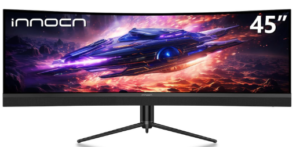
The INNOCN 45C1R 45 inch Curved Gaming Monitor is designed for users who want a wide immersive display for both gaming and productivity. It delivers a large viewing space that supports multitasking and detailed visual work.
The monitor uses a 45 inch VA panel with a 32:9 ultra wide aspect ratio. The resolution is 5120 by 1440, which creates a wide horizontal workspace. This allows multiple windows to stay open side by side. It improves workflow efficiency for editing, coding, and multitasking tasks.
The screen has a 1500R curvature. This shape brings the edges of the display closer to your natural field of view. It reduces eye movement across the screen. This makes long viewing sessions more comfortable and less tiring.
Color performance is strong and consistent. The monitor supports 99 percent sRGB color coverage. This improves color accuracy for creative work and entertainment. HDR 400 support increases contrast range. Dark scenes appear deeper. Bright areas remain controlled and visible.
Gaming performance is smooth and stable. The monitor supports up to 120Hz refresh rate. Adaptive Sync helps reduce screen tearing. Motion feels more fluid during fast gameplay. This improves responsiveness in competitive and action based games.
Connectivity is wide and flexible. It includes HDMI 2.1 ports, DisplayPort 1.4, and USB C with 65W power delivery. It also supports USB A, USB B, and Ethernet connection. This allows multiple devices to connect without frequent cable changes.
The INNOCN 45C1R 45 Inch Curved Gaming Monitor fits within the best Curved Gaming Monitors under $500 category because it combines ultrawide productivity space, smooth gaming performance, and strong color accuracy in one display.
Comfort features support long use sessions. The stand allows height, tilt, and swivel adjustments. The curved design helps reduce strain during extended viewing. Low blue light and flicker free technology improve eye comfort over time.
Pros
- Massive 45 inch ultrawide display improves multitasking and immersion
- 32:9 aspect ratio provides extensive workspace
- 1500R curve enhances comfort and reduces eye strain
- 120Hz refresh rate delivers smooth gaming performance
- Adaptive Sync reduces screen tearing and stuttering
- Strong 99 percent sRGB color accuracy
Cons
- Large size requires significant desk space
Read more: 6 Best Curved Gaming Monitors under 250
Advantages of using Curved Gaming Monitors under $500
Frequently Asked Questions (FAQs)
Are curved gaming monitors worth it for gaming?
Curved gaming monitors are worth it for many users because they improve immersion and reduce eye movement across the screen. The curved design helps the display feel more natural to view, especially during long gaming sessions. This can make gameplay feel more engaging and comfortable compared to flat screens, particularly in wide or ultrawide formats.
What refresh rate is best for curved gaming monitors under budget ranges?
A higher refresh rate is generally better because it makes motion appear smoother and more responsive. For gaming, 120Hz and above is considered a strong standard since it reduces motion blur and improves visual fluidity. This is especially useful in fast paced games where reaction time and smooth tracking are important.
Is resolution or refresh rate more important for gaming performance?
Both matter, but the priority depends on the user. Resolution improves image clarity and detail, while refresh rate improves motion smoothness and responsiveness. Competitive gamers often prioritize refresh rate, while casual gamers and content creators may value higher resolution for sharper visuals and better detail.
Do curved gaming monitors help reduce eye strain?
Yes, curved displays can help reduce eye strain by aligning more naturally with the human field of vision. This reduces the need for constant eye movement across wide screens. Combined with features like low blue light and flicker reduction, curved monitors can offer a more comfortable experience during long use sessions.
What should be prioritized when choosing the Best Curved Gaming Monitors under $500?
When selecting from the best Curved Gaming Monitors under $500, it is important to balance size, resolution, refresh rate, and panel quality. Users should also consider connectivity options and ergonomic adjustability. The right choice depends on whether the focus is gaming performance, productivity, or a mix of both.
Conclusion
The best Curved Gaming Monitors under $500 prove that you do not need to spend a fortune to get a display that genuinely elevates your setup. Across the options covered in this guide, the consistent strengths are hard to overlook: wide immersive panels that draw you into the action, high refresh rates and fast response times that keep gameplay smooth and responsive, strong color accuracy that makes visuals feel rich and balanced, and flexible connectivity that supports multiple devices without friction.
Beyond raw performance, the ergonomic design and eye comfort features built into these monitors make them practical for long sessions whether you are gaming, working, or doing both. What makes this category worth considering is not just what each monitor does individually but how well they deliver on value as a whole, giving you premium level features at a price point that remains accessible.
If immersion, performance and versatility matter to you, the right curved gaming monitor under $500 is not a compromise. It is simply a smart choice.