
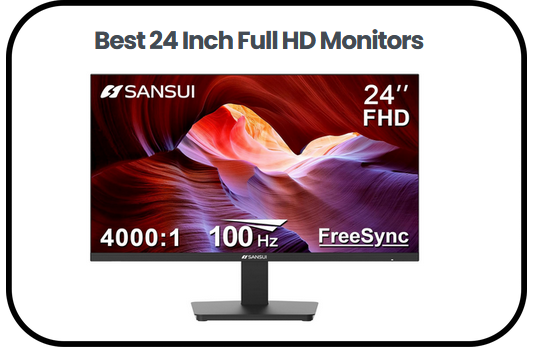
In this review of the best 24 Inch Full HD Monitors, I will walk you through everything you need to know before making a purchase that your eyes and productivity will thank you for every single day. I have spent considerable time evaluating what separates a truly great display from one that simply ticks boxes on a spec sheet and I can tell you that the right 24 inch Full HD monitor is one of the most impactful upgrades you can make to any workspace without breaking the bank.
At this screen size, Full HD resolution hits a sweet spot that larger displays cannot always match, delivering crisp, readable text and balanced visuals without demanding more desk space or system power than most users have available. Whether you are deep in a workday spreadsheet, streaming your favorite series late at night or squeezing in a few gaming sessions between meetings, these monitors are built to handle all of it with surprising comfort and consistency.
In the sections ahead, I will break down the key features to look for, share my top picks across different use cases and budgets, walk you through a practical buying guide and answer the most common questions buyers have before committing to a screen they plan to stare at for years to come.
Quick Overview of the Best 24 Inch Full HD Monitors:
- Philips New 24 Inch Frameless Full HD Monitor — Best for Eye Comfort and All Day Use
- Sansui 24 Inch 100Hz PC Monitor — Best Budget Pick for Smooth Everyday Performance
- Amazon Basics 24 Inch Full HD IPS Monitor — Best No Frills Option for Simple Daily Tasks
- LG 24U411A-B 24 Inch Full HD Computer Monitor — Best for Multitasking and Productivity
- AOC 24B35H3 24 Inch Full HD Monitor — Best All Round Performer for Work and Entertainment
- KOORUI 24 Inch Computer Monitor — Best Value Pick for Visual Depth and Color Balance
- Dell P2425H 24 Inch Full HD IPS Monitor — Best for Office Use and Ergonomic Flexibility
- LG 24G411A-B 24 Inch UltraGear Gaming Monitor — Best for Gaming and Immersive Visuals
Best 24 Inch Full HD Monitors
1) Philips New 24 Inch Frameless Full HD Monitor
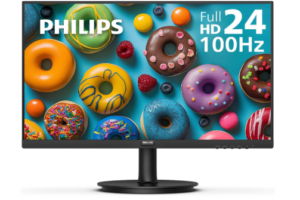
The Philips New 24 inch Frameless Full HD Monitor settles into your workspace quietly, doing exactly what most users need without trying to be more than it is. It is designed for people who spend hours on screens reading, typing, or watching content and simply want a display that feels easy on the eyes and consistent throughout the day.
In everyday use, it fits naturally into office setups, study desks, and home environments where reliability matters more than performance extremes. It is not built for competitive gaming or heavy creative workloads, but for documents, browsing, and video content, it delivers a steady and comfortable experience that does not demand constant adjustment.
The 23.8 inch Full HD resolution keeps text sharp and readable, which becomes important over long working sessions. Its VA panel adds noticeable depth to visuals, with darker blacks and brighter whites that make content feel more balanced. This contrast helps reduce visual fatigue, especially when switching between different types of content throughout the day.
What stands out more subtly is how the design supports modern setups. The three sided frameless build creates a cleaner look and makes the screen feel more open, especially in multi monitor arrangements. Viewing angles remain stable at 178 degrees, so the image holds up even when you are not sitting directly in front of it. With Adaptive Sync included, motion during videos or casual gaming appears smoother, adding to an overall sense of stability.
Pros
- Strong contrast with VA panel for better visual depth
- Wide viewing angles with consistent image quality
- Frameless design supports clean and modern setups
- Adaptive Sync improves motion smoothness
- Eye comfort features support long usage sessions
Cons
- Not designed for fast paced or competitive gaming
2) Sansui 24 Inch 100Hz PC Monitor
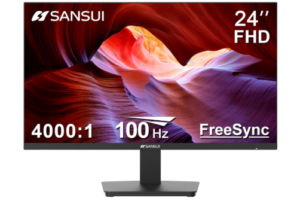
The SANSUI 24 Inch 100Hz PC Monitor immediately feels different the moment you start using it. The jump from a standard 60Hz display is noticeable in a way that goes beyond specifications, making scrolling, switching between tabs, and general navigation feel smoother and more responsive.
It fits best in setups where one screen handles everything: work, study, and a bit of entertainment. Whether it is assignments, office tasks, or streaming content, the monitor adapts easily without feeling limited. It does not aim at high end gaming or professional creative work, but for everyday computing, it brings a level of fluidity that many users do not realize they are missing.
The VA panel plays a big role in how content appears. Darker scenes feel deeper, while brighter areas stay controlled, giving the screen a more balanced and readable look. HDR10 support adds a bit more range when viewing compatible content, especially in movies and videos. The brightness level works best indoors, where the display remains comfortable without becoming harsh, and the anti glare coating helps reduce distractions from surrounding light.
Where this monitor quietly stands out is in motion handling. The 100Hz refresh rate combined with FreeSync keeps movement smooth and reduces tearing, which makes everything from scrolling to casual gaming feel more natural. Over longer sessions, features like low blue light filtering and flicker reduction help maintain comfort, especially for users who spend most of their day in front of a screen.
Flexibility is also part of its appeal. The tilt adjustable stand allows basic positioning, while VESA compatibility opens the option for mounting on arms or walls. With HDMI and VGA connectivity, it works easily with most devices without extra setup.
Pros
- 100Hz refresh rate improves smoothness in daily use
- VA panel delivers strong contrast and deeper blacks
- HDR10 support enhances video content
- FreeSync reduces screen tearing
- Wide viewing angles for consistent visuals
Cons
- Brightness may feel limited in very bright rooms
3) Amazon Basics 24 Inch Full HD IPS Monitor
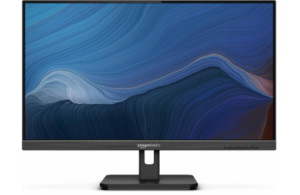
The Amazon Basics 24 inch Full HD IPS Monitor keeps things simple, focusing on delivering a stable and predictable experience for everyday tasks. It does not try to stand out with advanced features, but instead provides the kind of consistency that many users rely on for work and study.
In daily use, it handles office work, online classes, browsing, and video calls without complications. It suits users who spend most of their time on documents and web based tasks, where clarity and comfort matter more than performance upgrades. For gaming or demanding creative work, it may feel limited, but for general use, it remains dependable throughout long sessions.
The Full HD resolution keeps text clear and easy to read, which is essential when working across spreadsheets, emails, or documents. Its IPS panel helps maintain color consistency even when viewed from different angles, making it a practical choice for shared spaces or flexible seating positions.
From a usability standpoint, it offers a good level of flexibility. Multiple connectivity options including HDMI, VGA, and DisplayPort make it compatible with a wide range of devices. The tilt adjustable stand allows basic ergonomic adjustments, while VESA mount support makes it easy to integrate into more customized setups. Its energy efficiency also adds quiet value for users who keep their systems running for extended hours.
Pros
- IPS panel delivers consistent and clear visuals
- Wide viewing angles improve usability in different positions
- Multiple ports support various device connections
- Tilt adjustment enhances viewing comfort
- VESA mount compatibility for flexible setups
Cons
- Lacks advanced features for professional creative work
4) LG 24U411A-B 24 Inch Full HD Computer Monitor
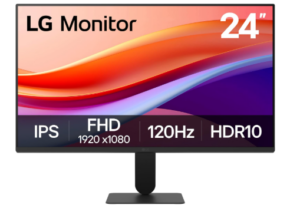
The LG 24U411A-B 24 inch Full HD Computer Monitor feels like a step up the moment you start using it. It brings a more refined balance of smooth performance, clean design, and everyday practicality, making it a strong fit within the best 24 Inch Full HD Monitors category for users moving beyond basic office displays.
In daily use, it adapts easily to a mix of tasks. From office work and online meetings to browsing and light creative projects, the experience remains steady and responsive. The 120Hz refresh rate is where the difference becomes noticeable, making scrolling, switching between windows, and general interaction feel smoother and more fluid. For users who spend long hours on screen, that added responsiveness makes a real difference over time.
The IPS Full HD panel keeps visuals sharp and consistent, with colors that remain stable even when viewed from different angles. This makes it suitable for both focused work and shared viewing environments. HDR10 support adds extra depth when watching content, while the wide color coverage helps images appear more natural without feeling exaggerated. Text clarity also holds up well during extended reading sessions, which supports long periods of productivity.
What adds to its appeal is how it fits into modern setups. The ultra slim bezel design creates a clean, open look and works especially well in dual monitor arrangements. LG’s Switch app introduces a more flexible way to manage tasks, allowing screen splitting that makes multitasking feel more organized. Features like tilt adjustment and Reader Mode further improve comfort, helping reduce strain during long hours of use.
Pros
- HDR10 enhances depth in supported content
- Slim bezel design supports clean multi monitor setups
- Switch app improves multitasking workflow
- Reader Mode supports eye comfort during long sessions
- Tilt adjustment allows better viewing positioning
Cons
- No built in speakers included
5) AOC 24B35H3 24 Inch Full HD Monitor
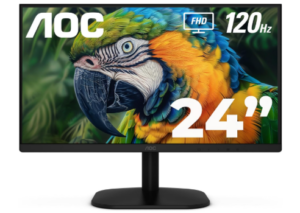
The AOC 24B35H3 24 inch IPS Full HD Monitor fits comfortably within the best 24 Inch Full HD Monitors category by offering a balanced mix of smooth performance and consistent visual quality. It is designed for users who want a display that feels responsive during everyday tasks while still delivering reliable clarity for both work and entertainment.
In daily use, it adapts easily to office work, online meetings, browsing, and media consumption. The 120Hz refresh rate makes interactions feel smoother, especially when scrolling through pages or switching between applications. With Adaptive Sync included, motion remains stable with reduced tearing, which adds a more fluid feel during video playback and light gaming.
The IPS Full HD panel keeps visuals clear and consistent across different viewing positions. With wide 178 degree viewing angles, the image holds its quality even when viewed from the side. Color performance is also well balanced, with 100 percent sRGB and 84 percent NTSC coverage helping content appear natural and accurate without looking overly saturated. This makes it suitable for both productivity and casual viewing.
Comfort and usability are well considered. Flicker Free technology and Low Blue Light mode help reduce eye strain during long sessions, making it easier to work for extended hours. Connectivity remains simple with HDMI and VGA ports, along with a 3.5 mm earphone output for private listening. The tilt adjustable stand and VESA mount compatibility give users flexibility in how they set up their workspace, while its energy efficient design supports long term daily use.
Pros
- 120Hz refresh rate improves smoothness in daily use
- IPS panel delivers consistent and clear visuals
- Wide color coverage supports natural image quality
- Eye comfort features help during long sessions
- Flexible connectivity with HDMI and VGA
- VESA mount compatibility for custom setups
Cons
- Not designed for high end creative work
6) KOORUI 24 Inch Computer Monitor
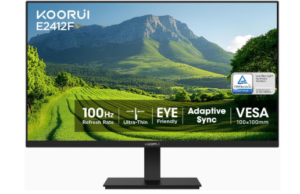
The KOORUI 24 inch Computer Monitor brings together clarity, depth, and everyday flexibility in a way that feels easy to live with. It suits users who want a screen that can handle different parts of their day without constantly reminding them of its limits, whether that is work, study, or a bit of downtime.
Across daily tasks, it keeps things flowing without effort. Moving through documents, switching between tabs, or watching content feels smoother thanks to the 100Hz refresh rate. Adaptive Sync adds another layer of stability by reducing visual interruptions, so motion appears more continuous rather than broken or uneven. This makes a difference over time, especially for users who spend long hours in front of a screen.
Placed right in the middle of the best 24 Inch Full HD Monitors category, this display leans into visual depth and color balance. The high contrast ratio gives darker scenes more weight while keeping brighter areas controlled, creating a more grounded image overall. With 99 percent sRGB coverage and support for a wide range of colors, visuals come through with a natural tone that works well for both productivity and casual viewing.
Its design and usability follow the same practical approach. Eye care features such as low blue light filtering and flicker reduction help keep viewing comfortable over extended periods, while the anti glare surface limits distractions from surrounding light.
The slim three sided bezel gives it a more open look on the desk, and connectivity options including HDMI, VGA, and audio output make it easy to pair with different devices. With tilt adjustment and VESA support, it adapts easily to different workspace setups.
Pros
- Smooth 100Hz performance improves overall screen flow
- Strong contrast delivers deeper and more defined visuals
- Eye care features support extended viewing comfort
- Slim bezel design enhances workspace appearance
- Multiple input options improve compatibility
- Flexible mounting options support different setups
Cons
- No DisplayPort connection available
- Adapter needed for USB C devices
7) Dell P2425H 24 Inch Full HD IPS Monitor
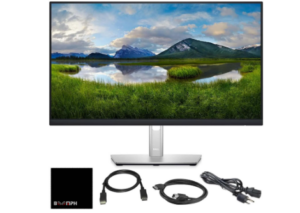
The Dell P2425H 24 inch Full HD IPS Monitor brings a more polished and flexible experience to users who need a screen that can keep up with structured workdays. It is designed for environments where comfort, adjustability, and consistent performance matter, making it a strong fit for office setups and productivity focused users.
In everyday use, it handles tasks like document work, spreadsheets, meetings, and extended browsing with ease. The IPS panel keeps visuals stable and clear from different angles, which is useful in shared workspaces or shifting desk positions. With a Full HD resolution and support for 16.7 million colors, text remains sharp while images maintain a natural appearance that does not feel exaggerated.
The monitor also introduces a smoother interaction compared to traditional office displays. With a 100Hz refresh rate and a 5 ms response time, movement across the screen feels more controlled and responsive. The 1500:1 contrast ratio helps separate darker and brighter areas more clearly, giving content a more defined look. Eye comfort is also well addressed, with TÜV certified features that reduce blue light exposure and an anti glare finish that keeps the screen comfortable to view throughout the day.
Flexibility is where this monitor becomes even more practical. It supports tilt, swivel, pivot, and height adjustments, allowing users to fine tune their setup for better posture and comfort. Connectivity is equally versatile, with HDMI, DisplayPort, VGA, and multiple USB ports including USB C support with power delivery.
Built with recycled materials and energy saving features like PowerNap, it reflects a more thoughtful approach to long term use. Within the best 24 Inch Full HD Monitors category, it stands out as a reliable option for users who prioritize comfort, connectivity, and a well balanced workspace experience.
Pros
- IPS panel provides consistent and clear visuals
- 100Hz refresh rate improves screen responsiveness
- Full ergonomic adjustments support better positioning
- Wide range of connectivity options including USB C
- Eye comfort features reduce strain during long sessions
Cons
- Brightness may feel moderate in very bright spaces
8) LG 24G411A-B 24 Inch UltraGear Gaming Monitor
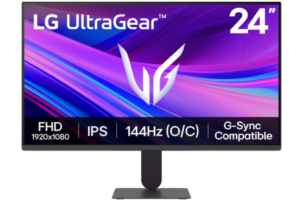
The LG 24G411A-B 24 inch UltraGear Full HD Gaming Monitor is built for users who want a compact screen that still carries strong gaming capability and visual clarity. It blends speed, color richness, and responsive control in a way that fits both competitive play and everyday use, making it a solid choice within the best 24 Inch Full HD Monitors category.
In day to day use, the experience feels quick and steady, especially when moving between games, applications, or streaming content. The 120Hz native refresh rate, with the option to reach 144Hz through overclocking, gives motion a more continuous feel, particularly in fast paced scenes. Combined with 1ms Motion Blur Reduction, fast movement stays visually controlled with less smearing, helping maintain focus during action heavy moments. G SYNC compatibility and AMD FreeSync also work in the background to keep gameplay stable and reduce visual interruptions.
The IPS Full HD panel brings consistent image quality with wide viewing angles and strong color output. HDR10 support together with up to 99 percent sRGB coverage allows scenes to appear more vivid and closer to their intended design. Visual elements like shadows, lighting, and environmental detail feel more defined, creating a more engaging viewing experience whether you are gaming or watching content.
Beyond visuals, the monitor adds practical tools that support both performance and comfort. Dynamic Action Sync helps actions feel more immediate by lowering input delay, while Black Stabilizer improves visibility in darker scenes so details are easier to notice. The on screen crosshair feature supports precision in shooting games, and the Switch app allows flexible screen organization for multitasking. With its slim bezel design and tilt adjustable stand, the display maintains a clean setup while staying comfortable for long sessions.
Pros
- 1ms motion blur reduction keeps fast action clearer
- HDR10 and 99 percent sRGB enhance visual depth and richness
- G SYNC and FreeSync help maintain stable gameplay
- Gaming tools improve visibility and responsiveness
- Switch app supports multitasking flexibility
- Slim design creates a clean and immersive setup
Cons
- Overclocked refresh rate depends on system capability
Read more: 7 Best 4k Computer Monitors
Advantages of Using the 24 Inch Full HD Monitors
Balanced fit for everyday workspaces
One major advantage of the best 24 Inch Full HD Monitors is how well they fit into most desk environments. The size is compact enough for smaller spaces but still large enough to support multitasking without feeling cramped. This makes them practical for offices, study setups, and home use where space efficiency and usability need to work together.
Clear Full HD visual clarity
Another benefit is the sharp and dependable image quality that comes with Full HD resolution at this screen size. Text appears clean and readable, which supports long hours of document work, browsing, and online tasks. Visual content also maintains a natural and balanced appearance, making everyday use more comfortable and less tiring for the eyes.
Smoother visual interaction
A noticeable advantage in many of the best 24 Inch Full HD Monitors is improved motion handling through higher refresh rates. Scrolling, switching between applications, and watching videos feels more fluid and continuous. This smoother interaction helps reduce visual fatigue and creates a more comfortable experience during extended screen time.
Comfort focused viewing experience
Eye comfort features are another strong benefit, especially for users who spend long hours in front of a screen. Technologies that reduce flicker, limit blue light exposure, and minimize glare help create a more relaxed viewing environment. Over time, this supports better focus and reduces strain during long working or study sessions.
Space efficient design for modern setups
These monitors are designed to offer strong functionality without taking up unnecessary space. Their compact footprint makes them suitable for clean and organized desks, especially in shared or limited areas. This allows users to maintain a neat setup while still enjoying a full and practical display experience.
Versatile use across different activities
Another advantage is their ability to handle multiple types of tasks without difficulty. They perform well for office work, online learning, browsing, media consumption, and light creative use. This flexibility makes them a practical choice for users who want one screen that can handle different parts of their daily routine.
Consistent color and viewing angles
Many models in this category offer stable color performance that remains consistent from different viewing positions. This means the display maintains its quality even when viewed from the side, which is useful in shared environments or flexible seating arrangements. The result is a more reliable and visually steady experience across different uses.
Better value for everyday users
A key advantage of the best 24 Inch Full HD Monitors is the balance between performance and affordability. They provide essential features needed for daily computing without unnecessary complexity or cost. This makes them a practical option for users who want reliable performance without moving into higher priced or specialized display categories.
Factors to Consider when Choosing the Best 24 Inch Full HD Monitors
Display clarity and resolution quality
One of the most important factors when choosing a monitor in this category is how clear and detailed the display appears during everyday use. Full HD resolution is typically the standard here, and it should deliver sharp text, clean images, and a comfortable viewing experience. This becomes especially important for users who spend long hours working on documents, browsing, or watching content, since poor clarity can quickly lead to eye strain and reduced productivity.
Panel type and viewing angles
The type of display panel has a direct impact on how colors and visuals appear from different positions. IPS panels usually offer wider viewing angles and more consistent color accuracy, while VA panels tend to provide deeper contrast. Choosing the right panel depends on how the screen will be used, especially if multiple people view it or if the user frequently changes seating position throughout the day.
Refresh rate and motion smoothness
Refresh rate plays a key role in how smooth movement appears on the screen. Higher refresh rates make actions like scrolling, switching windows, and watching videos feel more fluid and responsive. This factor is particularly important for users who want a more modern and comfortable visual experience, even outside of gaming use.
Eye comfort and long use features
Eye comfort features are essential for anyone spending extended time in front of a screen. Technologies that reduce flicker, limit blue light exposure, and control glare help minimize visual fatigue. Over time, these features support better focus and reduce strain, making daily work or study sessions more sustainable and less tiring.
Screen size suitability for workspace
The 24 inch size is popular because it offers a balanced viewing experience without overwhelming the desk space. However, it is still important to consider how the monitor fits into the available workspace. A well matched screen size helps maintain comfort, proper viewing distance, and efficient desk organization, especially in compact or shared environments.
Connectivity options and device compatibility
Another important factor is how easily the monitor connects to different devices. Modern users may need HDMI, DisplayPort, VGA, or USB support depending on their setup. Good connectivity ensures flexibility when switching between laptops, desktops, or other devices, and reduces the need for additional adapters or complex setups.
Ergonomics and adjustability
Comfort during long use depends heavily on how adjustable the monitor is. Features such as tilt, height adjustment, swivel, and pivot allow users to position the screen in a way that supports better posture. This reduces physical strain on the neck and eyes, especially during long working or study sessions.
Color accuracy and visual performance
Color reproduction matters for both productivity and entertainment. A good monitor should display balanced and natural colors without distortion or oversaturation. This is important for tasks like content viewing, basic design work, and media consumption, where visual accuracy enhances the overall experience.