3) Acer Nitro 27 Inch Curved Zero-Frame Monitor
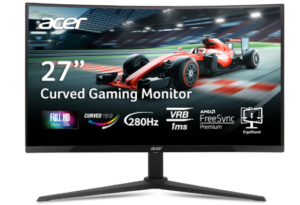
The Acer Nitro 27 Inch Curved Gaming Monitor is built for users who want speed, immersion, and a modern design without going over budget. Its 27-inch Full HD display delivers clear and vibrant visuals for both gaming and everyday use. The zero-frame design removes thick borders, giving you more screen space and a cleaner look. This also makes it easier to set up multiple monitors side by side for a seamless viewing experience.
Performance is fast and highly responsive. With a refresh rate of up to 280Hz, motion appears extremely smooth, especially in fast-paced games. This high refresh rate reduces input lag and improves how quickly frames are displayed. The 1ms response time further enhances this experience by reducing blur and ghosting during rapid movements. As a result, gameplay feels sharp and fluid even in intense scenes.
The monitor also includes AMD FreeSync Premium technology, which helps eliminate screen tearing and stuttering. It syncs the monitor’s refresh rate with your graphics card for smoother performance. Combined with the 1500R curved screen, this creates a more immersive experience by filling more of your peripheral vision. The curved design makes games feel more engaging while also helping you stay focused on the action.
Visual quality is solid for its class. The Full HD resolution provides good clarity, while the VA panel delivers strong contrast and deeper blacks. With support for HDR10 and 99% sRGB color coverage, colors appear more vivid and lifelike. This makes the monitor suitable not just for gaming, but also for watching movies and general content consumption.
Comfort and flexibility are also well addressed. The ergonomic stand allows tilt, swivel, and height adjustment, so you can find a comfortable viewing position with ease. It also supports VESA mounting if you prefer a wall or arm setup. Connectivity is straightforward with one DisplayPort and two HDMI ports. The inclusion of both HDMI and DisplayPort cables makes setup simple right out of the box.
As one of the best 27 Inch Curved Monitors under 200, the Acer Nitro XZ270 offers an excellent mix of speed, immersion, and practical features. It is a strong option for users who want a smooth gaming experience, flexible ergonomics, and a modern design without spending too much.
Pros
- Up to 280Hz refresh rate delivers ultra smooth motion
- 1ms response time reduces blur and ghosting
- AMD FreeSync Premium improves overall gameplay smoothness
- 1500R curved screen enhances immersion
- Zero-frame design provides more screen space and a modern look
- Ergonomic stand with height, tilt and swivel adjustment
Cons
- VA panel may have slower response in very dark transitions
4) Sceptre Curved 27-inch Prime Monitor
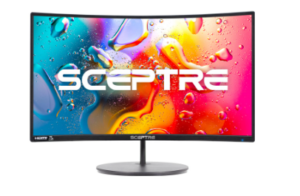
The Sceptre Curved 27-inch Prime Monitor is a practical option for users who want an immersive display without spending too much. Its 1500R curved design draws you into the screen, making everyday tasks and casual gaming feel more engaging. The curve helps fill your field of view, which can improve focus whether you are browsing, working, or watching content.
Visual performance is solid for general use. The Full HD resolution delivers clear images, while the 99% sRGB color coverage produces richer and more accurate colors than many basic monitors. This makes it suitable for streaming, light content creation, and everyday viewing. The wide viewing angles also help maintain consistent colors, even when looking at the screen from different positions.
Smoothness is supported through its refresh rate of up to 100Hz via HDMI, which is an improvement over standard 60Hz displays. This results in cleaner motion when scrolling or watching videos. Adaptive Sync further enhances the experience by reducing screen tearing and stuttering. While it is not built for high-end gaming, it still performs well for casual gameplay and general use.
The monitor also focuses on convenience and versatility. It includes two HDMI ports and one VGA port, making it easy to connect multiple devices. Built-in speakers provide basic audio, which helps save desk space and reduces the need for external speakers. This makes it a good fit for simple setups at home or in an office environment.
Design and comfort are also well considered. The slim profile and curved screen create a modern look that fits easily into different spaces. With a brightness level of 250 nits and a wide viewing angle, it performs reliably in most indoor lighting conditions. Overall, it offers a balanced mix of immersion, color quality, and ease of use for users who want a budget-friendly curved monitor.
Pros
- 1500R curved screen improves immersion
- 99% sRGB provides better color accuracy
- 100Hz refresh rate offers smoother motion than standard displays
- Adaptive Sync reduces screen tearing and stuttering
- Multiple ports allow easy connection to different devices
- Built-in speakers save space and add convenience
Cons
- Full HD resolution may not appear very sharp on a 27-inch screen
5) CRUA 27″ Curved Gaming Monitor
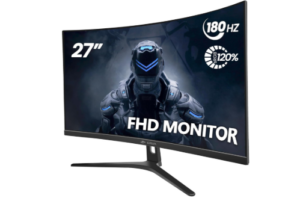
The CRUA 27 inch Curved Gaming Monitor is built for users who want smooth performance and immersive visuals at an affordable price. Its 1800R curved design brings the screen closer to your natural field of view, making games and everyday tasks feel more engaging. The slim bezels and clean design also give it a modern look that fits well in both gaming and work setups.
Performance is fast and responsive. With a 180Hz refresh rate, motion appears smooth and fluid, especially during fast-paced gameplay. The 1ms response time helps reduce blur and keeps transitions sharp. FreeSync support further improves the experience by reducing screen tearing and stuttering. As a result, gameplay feels more stable and enjoyable across different types of content.
Visual quality is another strong point. The monitor offers 120% sRGB color coverage, which produces rich and vibrant colors. With 16.7 million colors, a 3000 to 1 contrast ratio, and 250 nits brightness, images appear clear and detailed. This makes it suitable for gaming, streaming, and even light creative work. The wide viewing angles also help maintain consistent visuals from different positions.
Comfort is well addressed for long sessions. The 1800R curve reduces the need for constant head movement, while the flicker-free screen and blue light filter help reduce eye strain. The adjustable tilt allows you to find a comfortable viewing angle, making it easier to use the monitor for extended periods without discomfort.
Connectivity is flexible and easy to manage. The monitor supports HDMI and DisplayPort, allowing you to connect gaming consoles, laptops, or desktops with ease. HDMI supports up to 120Hz, while DisplayPort allows the full 180Hz experience. It also includes an audio output for connecting headphones or external speakers. VESA compatibility gives you the option to mount the monitor and save desk space.
Additional gaming features improve usability. The built-in crosshair function can help improve accuracy in shooting and competitive games. Combined with its smooth performance and immersive design, this monitor is a solid choice for users looking for a balance between price and capability.
Pros
- 180Hz refresh rate delivers smooth and fluid motion
- 1ms response time reduces blur in fast scenes
- 120% sRGB provides rich and vibrant colors
- FreeSync reduces screen tearing and stuttering
- Eye care features help reduce strain during long use
- Flexible connectivity with HDMI and DisplayPort
- Crosshair feature supports better aiming in games
Cons
- Built-in speakers are not included
6) Z-Edge 27 Inch Curved Gaming Monitor
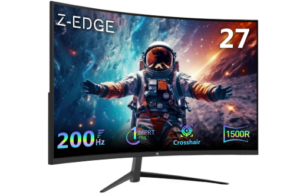
The Z-Edge 27 inch Curved Gaming Monitor delivers a more engaging viewing setup for users who want a wider and more dynamic screen presence. Its 1500R curvature naturally draws your attention toward the center, helping reduce distractions around the edges. Whether you are gaming or watching content, the screen feels more surrounding and visually connected.
Speed and responsiveness are key strengths here. The 200Hz refresh rate allows motion to appear noticeably cleaner, especially in fast-moving scenes. Combined with a 1ms response time, transitions look sharper with minimal blur. This makes a difference in action-heavy games where quick reactions matter. FreeSync support also helps keep visuals consistent by reducing stutter and frame mismatches.
In the mid-range category of the best 27 Inch Curved Monitors under 200, this display holds its ground with solid image performance. The Full HD panel delivers good clarity, while the 3000 to 1 contrast ratio improves depth between dark and bright areas. As a result, details remain visible even in shadow-heavy scenes. Colors appear natural and well-balanced for everyday viewing and entertainment.
The overall build leans toward a clean and modern style. Its slim, edge-to-edge design gives you more usable screen space and works well in multi-monitor setups. The monitor also supports VESA mounting, allowing you to position it on a wall or adjustable arm for better desk organization and viewing flexibility.
Connectivity is straightforward and reliable. Both HDMI and DisplayPort options are included, and each supports high refresh rates for smoother output. This makes switching between devices simple, whether you are using a PC, console, or streaming setup. The included DisplayPort cable is a practical addition for immediate use.
Extended usage feels more comfortable thanks to its eye care features. The blue light filter helps reduce fatigue over time, while flicker reduction supports a steadier image. These additions are useful for users who spend long hours in front of the screen.
Pros
- 200Hz refresh rate improves motion clarity in fast scenes
- 1ms response time keeps transitions sharp
- 1500R curvature creates a more engaging field of view
- FreeSync helps stabilize gameplay visuals
- Strong contrast ratio enhances depth and detail
- Slim bezels support cleaner multi-monitor setups
- VESA compatibility allows flexible positioning
- DisplayPort cable included for quick setup
Cons
- Brightness may struggle in very bright rooms
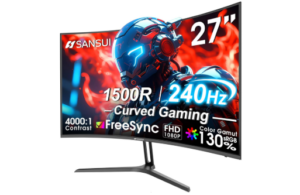
7) Amzfast 27 Inch 240Hz Curved Gaming Monitor
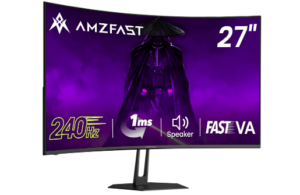
The Amzfast 27 inch 240Hz Curved Gaming Monitor is built for users who want high-speed performance with a more engaging screen layout. Its curved display helps draw your focus toward the center, creating a more connected viewing experience. This makes it a solid option for gaming, streaming, and everyday tasks without feeling flat or restrictive.
Speed and responsiveness are major strengths. The fast VA panel improves response time compared to standard VA displays, helping reduce delays during fast movements. With a 240Hz refresh rate, motion appears crisp and consistent, even in action-heavy scenes. Adaptive Sync further stabilizes performance by reducing screen tearing and uneven frame delivery. As a result, gameplay feels more controlled and visually steady.
Visual quality is also well balanced. The monitor supports 130% sRGB and displays 16.7 million colors, which helps produce rich and accurate tones. A 4000 to 1 contrast ratio improves depth, making darker scenes easier to follow. With HDR10 support and 300 nits brightness, images appear clearer with better separation between light and dark areas. Anti-glare and flicker reduction features also help maintain a more comfortable viewing experience.
Gaming features add extra flexibility. It includes preset modes for FPS, RTS, and RPG games, allowing you to adjust visuals based on what you are playing. Crosshair assistance can improve accuracy in shooting games, while black level adjustment helps reveal details in darker areas. These tools make it easier to adapt the display to different gaming styles.
The design keeps things practical and user friendly. It supports both HDMI 2.0 and DisplayPort 1.4 connections, making it easy to connect to a range of devices. The monitor is also VESA compatible, giving you the option to mount it for a cleaner setup. Built-in dual 2W speakers provide basic audio, which is useful for saving desk space when external speakers are not available.
Among the best 27 Inch Curved Monitors under 200, this model combines strong refresh rates, solid color performance, and useful gaming tools. It also includes a DisplayPort cable for quick setup, along with warranty support that adds peace of mind for long-term use.
Pros
- 240Hz refresh rate delivers very fluid motion
- Fast VA panel improves response speed
- Adaptive Sync helps reduce screen tearing
- High contrast ratio enhances depth and detail
- Wide color coverage produces rich visuals
- Multiple gaming modes improve flexibility
- Built-in speakers add convenience
- VESA compatibility supports flexible setup
Cons
- Built-in speakers offer average sound quality
8) KTC 27 Inch Gaming Monitor
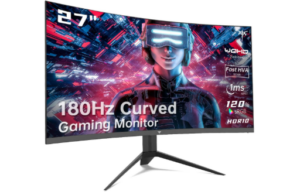
The KTC 27 inch Gaming Monitor positions itself as a higher-resolution option in the curved monitor category, offering a more detailed viewing experience than typical Full HD displays. Its 1500R curvature gently wraps the screen into your field of view, which helps reduce visual distractions at the edges and keeps focus centered during both gameplay and general use.
Performance is built around speed and consistency. A refresh rate of up to 170Hz works together with a 1ms response time to keep motion transitions tight and well controlled. Rapid movements in games remain readable, with reduced blur during fast camera shifts. Support for both FreeSync and G-Sync ensures frame synchronization with your graphics card, which helps maintain steady output during demanding scenes and reduces visual disruptions.
In the category of the best 27 Inch Curved Monitors under 200, this model stands out mainly because of its higher resolution. The 2560 by 1440 panel increases pixel density, making text sharper and game environments more defined compared to standard 1080p screens. Color reproduction is expanded through 120% sRGB coverage, while HDR10 adds extra dynamic range for highlights and shadows. A strong 4000 to 1 contrast ratio further improves depth perception, especially in darker environments.
Gaming support tools add functional advantages during play. Features such as Black Equalizer improve visibility in shadow-heavy scenes, while crosshair overlays assist with aiming precision in FPS titles. A built-in FPS counter and timer provide additional awareness during competitive sessions. These elements are designed to give more control over how visuals are presented in different game types.
The physical design is clean and practical. A slim three-sided bezel increases usable screen space and supports multi-monitor setups without obvious visual breaks. The side joystick control simplifies navigation through settings, reducing the need for multiple buttons. Tilt adjustment and VESA mounting support allow flexible positioning depending on workspace needs.
Extended use is made more comfortable through blue light filtering, which helps reduce eye fatigue during long sessions. Wide viewing angles also maintain consistent image quality even when viewed off-center, making the monitor suitable for both solo gaming and shared viewing scenarios.
Pros
- Higher 1440p resolution improves clarity and detail density
- 170Hz refresh rate supports smooth frame delivery
- FreeSync and G-Sync compatibility improve frame stability
- Strong contrast ratio improves depth in dark visuals
- Gaming utilities improve visibility and control during play
- Slim bezel design supports multi-screen setups
Cons
- Higher resolution may require stronger GPU performance
Check out: 8 Best Curved Gaming Monitors under $200
Advantages of Using the 27 Inch Curved Monitors under 200
Improved viewing immersion from curved design
Curved panels are designed to gently wrap the edges of the display into your natural field of vision. This creates a more immersive viewing experience by reducing the flat, detached feel of standard screens. In the best 27 Inch Curved Monitors under 200, this design helps you stay visually anchored whether you are gaming, streaming, or multitasking. Everything feels more connected, more focused, and easier to stay engaged with for longer periods.
Wider field engagement for multitasking and gaming
A curved display naturally fits more of the screen within your peripheral vision, which changes how you interact with content. Instead of constantly shifting attention from edge to edge, your eyes take in more information at once. In gaming, this improves situational awareness and reaction flow. In productivity work, it makes managing multiple windows feel smoother and less fragmented, helping you stay organized without visual strain.
Smoother motion for fast paced content
Monitors in this category often feature higher refresh rates that make motion feel noticeably more fluid. Fast action scenes appear clearer, scrolling feels more responsive, and transitions look cleaner overall. This matters in gaming where movement clarity can affect performance, but it also improves everyday use by making browsing, editing, and navigation feel more effortless and visually comfortable.
Balanced performance for everyday versatility
One of the biggest advantages of the best 27 Inch Curved Monitors under 200 is how well they balance different needs. You get gaming focused features like adaptive sync and fast response times, but without sacrificing everyday usability. Whether you are working, streaming content, or gaming after hours, the monitor adjusts well across tasks, making it a reliable single screen solution for most users.
Stronger visual depth and color presentation
Enhanced contrast and improved color reproduction give content more depth and realism. Dark scenes look richer and more defined, while bright areas stay clear without overwhelming detail. This creates a more engaging viewing experience across games, movies, and general use, making everything feel more visually complete and enjoyable to look at.
Reduced eye strain for longer sessions
Eye comfort features such as blue light reduction and flicker control help minimize fatigue during extended use. This becomes even more effective when combined with a curved screen, which supports a more natural viewing posture. Whether you are working late, studying, or gaming for long sessions, the display is designed to feel easier on the eyes over time.
Strong value in budget curved monitors
What makes the best 27 Inch Curved Monitors under 200 stand out is the level of modern performance they deliver at an affordable price. You get curved immersion, smooth visuals, and reliable everyday performance without moving into premium price ranges. For users who want a capable all round monitor without overspending, this category offers one of the best value propositions available today.
Factors to Consider when Choosing the Best 27 Inch Curved Monitors under 200
Screen curvature and viewing comfort
Screen curvature shapes how naturally the display fits into your field of view. A well balanced curve helps reduce side to side eye movement, creating a more immersive and less tiring experience. This is especially useful during long gaming sessions, work hours, or streaming. The key is choosing a curve that feels natural rather than exaggerated, so comfort and immersion work together instead of competing.
Refresh rate performance
Refresh rate plays a major role in how smooth everything feels on screen. Higher refresh rates make motion appear more fluid, which is especially important in fast paced gaming and scrolling heavy tasks. This smoother transition between frames reduces stutter and improves responsiveness, giving the display a more polished and modern feel during everyday use.
Response time efficiency
Response time determines how quickly pixels react to changes on screen. Lower response times reduce motion blur and ghosting, which makes fast moving scenes clearer and more accurate. In gaming, this improves visual precision during quick actions, while in general use it keeps movement sharp and easier to follow without distracting blur.
Display resolution and clarity
Resolution affects how sharp and detailed the image appears. On a 27 inch screen, clarity becomes more noticeable, especially when reading text or viewing high detail content. A good resolution ensures crisp visuals without straining the system, giving you a clean balance between performance and visual quality.
Color accuracy and contrast quality
Color and contrast define how vivid and lifelike the display feels. Better color coverage produces richer tones, while stronger contrast enhances depth between dark and bright areas. This improves immersion in games and movies while also making everyday content look more refined and visually appealing.
Connectivity and compatibility options
A good monitor should easily connect to all your devices without friction. Multiple input ports allow smooth switching between PCs, laptops, and consoles, making the setup more flexible. Compatibility with different refresh rates also ensures you get consistent performance no matter the device you are using.
Eye comfort and long use suitability
Eye comfort features are essential for reducing fatigue during long sessions. Blue light reduction and flicker control help stabilize the viewing experience and reduce strain over time. When combined with steady brightness and curved screen positioning, the monitor becomes more comfortable for extended work, study, or entertainment use.
Best 27 Inch Curved Monitors under 200 FAQs
Are the Best 27 Inch Curved Monitors under 200 good for gaming and everyday use?
Yes, the best 27 Inch Curved Monitors under 200 are well suited for both gaming and general use. The curved design enhances immersion by keeping more of the display within your natural field of vision, making gameplay feel more engaging and multitasking feel smoother. When paired with higher refresh rates and fast response times, they deliver fluid performance for gaming while still handling browsing, streaming, and office tasks comfortably.
What features should I prioritize when choosing a 27 inch curved monitor under 200?
When selecting a monitor in this range, it is important to focus on a balanced mix of features rather than a single specification. Refresh rate and response time influence how smooth motion feels, especially in gaming. Resolution affects clarity and sharpness on a 27 inch screen. Curvature improves viewing comfort and immersion, while color quality enhances overall visual experience. Connectivity options and eye comfort features also play a key role in long term usability.
Is a curved monitor better than a flat monitor at this price range?
A curved monitor can offer a more immersive and comfortable viewing experience compared to a flat display, especially for gaming and media consumption. The curvature helps reduce eye movement across wide edges and creates a more natural viewing flow. However, the overall experience still depends on the full set of specifications such as refresh rate, resolution, and panel quality, so the best choice is the one that delivers balanced performance rather than relying on curvature alone.
Conclusion
In conclusion, the best 27 Inch Curved Monitors under 200 offer a strong balance of immersion, performance and everyday practicality at a highly accessible price point.
They stand out because they bring together curved screen designs that enhance focus, smooth refresh rates that improve motion clarity and features like adaptive sync and eye comfort technologies that support long hours of use.
Whether for gaming, streaming or productivity, these monitors deliver a more engaging and comfortable viewing experience without stretching the budget.
Overall, they prove that you do not need a premium price tag to enjoy a modern, responsive and visually immersive display setup.