- Requires DisplayPort for maximum performance
4. Acer Nitro 27 inch Gaming Monitor
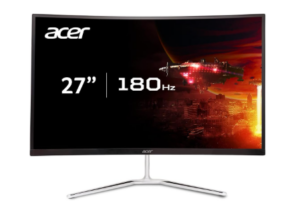
The Acer Nitro 27 inch WQHD Curved Gaming Monitor delivers a strong blend of sharp visuals, smooth performance, and immersive design that fits well within the budget gaming category. Its 1500R curved 27 inch display gently wraps the image into your field of view, helping games feel more engaging and naturally centered. This curvature enhances immersion by making the screen feel more connected to your perspective, especially during extended gaming sessions.
Performance is tuned for fast and responsive gameplay with a 180Hz refresh rate paired with up to 1ms VRB response time. Motion remains smooth even in fast moving scenes, which helps improve control in competitive gameplay. AMD FreeSync Premium technology also helps stabilize performance by syncing the monitor with your graphics card, reducing screen tearing and stuttering for a more consistent experience during action heavy moments.
Visual clarity is driven by a WQHD 2560 by 1440 resolution that delivers noticeably sharper detail than standard Full HD monitors. Images appear more refined and detailed, making both gaming and entertainment feel more immersive. HDR readiness improves contrast between bright and dark areas, while strong contrast performance adds depth to darker scenes. Wide viewing angles also ensure colors remain consistent even when viewed from different positions.
Usability is supported through a practical and flexible design that includes a tilt adjustable stand ranging from minus 5 to 20 degrees. The monitor also supports VESA mounting for custom setups and features a zero frame design that reduces distractions and works well in multi monitor configurations. Connectivity includes DisplayPort 1.2, HDMI 2.0 ports, and an audio out port, with cables included for convenience. Built in dual 2 watt speakers provide basic sound for everyday use. This makes it a strong contender among the best Curved Gaming Monitors under $200 for users seeking performance, clarity, and immersion in one package.
Pros
- Sharp WQHD 1440p resolution for detailed visuals
- Smooth 180Hz refresh rate for fluid gameplay
- Up to 1ms response time improves motion clarity
- AMD FreeSync Premium reduces tearing and stutter
- Curved display increases immersion
- Wide viewing angles maintain color consistency
- VESA support and ergonomic tilt for flexible setup
- Built in speakers for basic audio use
Cons
- Requires strong GPU support to fully use high refresh rate
5. ASUS TUF Gaming VG27VH1B 27 inch Curved Monitor
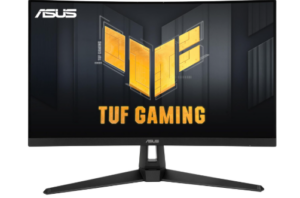
The ASUS TUF Gaming VG27VH1B 27 inch Curved Monitor stands firmly among the best Curved Gaming Monitors under $200 by combining fast performance, immersive curvature, and gamer focused features in a way that feels reliable for both competitive and casual play. The 1500R curved display helps pull the image into your field of view, making gameplay feel more engaging and reducing visual strain during long sessions. This curvature also improves comfort by keeping distances more consistent across the screen.
Performance is designed with speed in mind, featuring a 165Hz refresh rate that helps reduce lag and motion blur in fast paced games. Combined with ASUS Extreme Low Motion Blur technology, the monitor achieves a 1ms MPRT response time, which keeps moving objects sharp and reduces smearing during intense action. Adaptive Sync and FreeSync Premium support work together to eliminate screen tearing and ensure smoother frame delivery across compatible NVIDIA and AMD graphics cards.
Visual clarity is further improved through Shadow Boost technology, which enhances darker areas without washing out brighter parts of the screen. This makes it easier to spot details in shadow heavy scenes, especially in competitive games where visibility matters. The Full HD resolution keeps performance stable and efficient, while the curved design helps maintain consistent viewing angles with reduced distortion and color shift across the screen.
Usability is well supported with flexible connectivity options including HDMI 2.0, D Sub, and an earphone jack for audio output. The monitor also includes ergonomic tilt and swivel adjustments, allowing users to find a comfortable viewing position, and it supports VESA mounting for wall or arm setups. Flicker free technology helps reduce eye strain during long gaming sessions, making extended use more comfortable.
Pros
- Smooth 165Hz refresh rate for fast gameplay
- 1ms response time reduces motion blur and ghosting
- 1500R curved design improves immersion and comfort
- FreeSync Premium and Adaptive Sync reduce tearing
- Shadow Boost improves visibility in dark scenes
- Ergonomic stand with tilt and swivel adjustment
- Wide compatibility with NVIDIA and AMD GPUs
- Flicker free technology reduces eye strain
Cons
- Full HD resolution may feel limited on 27 inch screen
6. Acer Nitro 31.5 inch FHD Curved PC Gaming Monitor
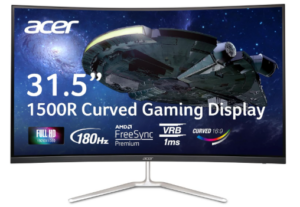
The Acer Nitro 31.5 inch Curved Gaming Monitor is designed for gamers who want a large immersive display without leaving the budget category, making it a strong contender among the best Curved Gaming Monitors under $200. Its 1500R curved VA panel expands the viewing experience by wrapping the screen gently across your field of vision. This larger format makes gameplay feel more cinematic and engaging, especially in open world and racing titles where screen space matters.
Performance is built for smooth and responsive gameplay with a 180Hz refresh rate and 1ms VRB response time. Motion stays fluid even in fast paced scenes, helping reduce blur and improve reaction clarity during competitive moments. AMD FreeSync Premium technology works alongside the refresh system to keep frame output stable, reducing screen tearing and choppiness so gameplay feels more consistent when action becomes intense.
Visual quality benefits from the Full HD 1920 by 1080 resolution combined with a VA panel that delivers strong contrast and deep blacks. The large 31.5 inch screen enhances immersion, making visuals feel wider and more expansive. With a contrast ratio reaching up to 100,000,000 to 1, scenes gain extra depth and separation between light and dark areas. Wide viewing angle support also ensures color consistency even when viewed from different positions.
Usability is supported through a simple and flexible design approach. The zero frame structure reduces distractions and makes the display feel more open, which is especially useful in multi monitor setups. Ergonomic tilt adjustment from minus 5 to 20 degrees helps improve comfort during long sessions, while VESA mounting support allows for alternative mounting options. Connectivity includes DisplayPort 1.2 and two HDMI 1.4 ports, with an HDMI cable included for easy setup.
Pros
- 1ms VRB response time reduces motion blur
- AMD FreeSync Premium improves frame stability
- Strong contrast delivers deep blacks and good depth
- Wide viewing angles maintain consistent visuals
- Zero frame design supports multi monitor setups
- Flexible tilt and VESA mounting options
Cons
- Large size requires more desk space
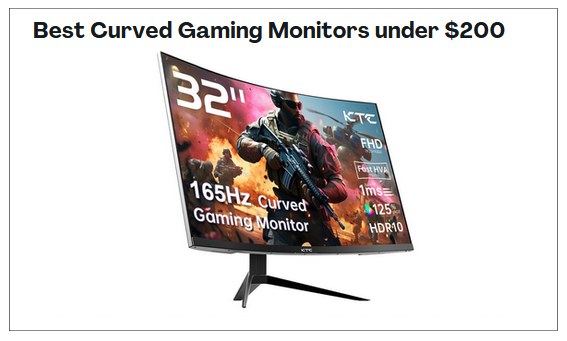
7. KTC 32 Inch FHD 1080p Curved Gaming Monitor
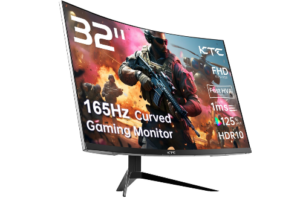
The KTC 32 Inch Curved Gaming Monitor earns its place among the best Curved Gaming Monitors under $200 by combining a large immersive display, fast gaming performance, and strong color output in a way that feels tailored for both competitive and casual players. Its 1500R curved HVA panel helps wrap the screen into your field of view, creating a more absorbing experience that makes it easier to stay focused on in game action and detect movement across wider scenes.
Performance is designed for speed and responsiveness with a 165Hz refresh rate paired with a 1ms MPRT response time. This combination helps reduce motion blur and keeps fast movement smooth and clear during gameplay. Adaptive Sync support, compatible with both FreeSync Premium and G Sync, helps maintain stable frame delivery by reducing screen tearing and stutter, which improves consistency during high intensity gaming sessions.
Visual quality is enhanced through 120 percent sRGB color coverage and HDR10 support, which bring out richer tones and stronger contrast across different environments. Colors appear more vivid and detailed compared to standard displays, making games feel more dynamic and visually engaging. The 32 inch screen size further expands the viewing experience, adding a cinematic feel that works well for open world games and entertainment content.
Usability is supported through a wide range of connectivity options including HDMI, DisplayPort, USB, earphone jack, and DC ports, allowing flexible setup across different devices. The ergonomic stand offers tilt adjustment from minus 5 to 15 degrees and supports VESA mounting for wall or arm installation. Gaming focused tools such as Crosshair, Black eQualizer, and a built in timer help improve visibility and accuracy during competitive play, while maintaining smoother performance during fast paced action.
Pros
- Large 32 inch curved display enhances immersion
- 165Hz refresh rate delivers smooth gameplay
- 1ms response time reduces motion blur
- Adaptive Sync supports FreeSync Premium and G Sync
- Strong color coverage with 120 percent sRGB
- HDR10 improves visual depth and contrast
- Wide connectivity options for flexible setups
- GamePlus tools improve competitive performance
Cons
- No built in speakers included
8. Sceptre 30 inch Curved Gaming Monitor
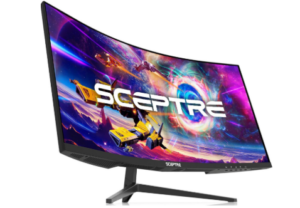
The Sceptre 30 inch Curved Gaming Monitor delivers a wide and immersive experience that makes it a strong choice for gamers who want a more cinematic setup without going beyond a budget range. Its 30 inch ultrawide curved display expands the field of view, helping games feel larger and more engaging. The 21 by 9 aspect ratio enhances this effect by giving more horizontal space, which works especially well in racing, simulation, and open world games.
Performance is designed for fast and responsive gameplay with refresh rates reaching up to 200Hz via DisplayPort and 120Hz through HDMI 2.0. This helps deliver smoother frame transitions and reduces motion blur during fast action. AMD FreeSync support also plays an important role by reducing screen tearing and stuttering, keeping gameplay stable when frame rates fluctuate. A 1ms MPRT response time further improves clarity during rapid movement, helping visuals stay sharp in competitive moments.
Visual output benefits from the ultrawide 2560 by 1080 resolution, which provides a wider viewing experience that enhances immersion. The monitor also supports 99 percent sRGB color coverage, producing richer and more accurate colors compared to standard displays. HDR400 improves contrast by brightening highlights and deepening darker areas, giving scenes more depth and variation. Anti flicker technology helps maintain stable visuals, reducing eye strain during long sessions.
Usability features support both gaming and productivity. Built in speakers offer basic audio output for everyday use, helping reduce the need for external devices. FPS and RTS display modes adjust settings depending on the type of game being played, while Blue Light Shift helps reduce eye fatigue during extended use. Connectivity includes multiple HDMI ports and a DisplayPort, and VESA mounting support allows flexible setup options. The thin bezel design also helps maximize screen space and improve immersion.
Pros
- Large 30 inch ultrawide curved display enhances immersion
- Up to 200Hz refresh rate for smoother gameplay
- 99 percent sRGB for strong color reproduction
- HDR400 improves contrast and detail
- Built in speakers for basic audio use
- VESA support and thin bezel design for flexible setup
Cons
- Ultrawide format requires stronger GPU performance
You can also check out: 8 Best Curved Gaming Monitors under $300
Advantages of the Curved Gaming Monitors under $200
Immersive Gaming Experience
One of the biggest advantages of using the best Curved Gaming Monitors under $200 is the more immersive viewing experience they create. A curved screen wraps visuals more naturally into your field of view, which makes games feel deeper and more engaging. This added sense of immersion can make everything from open world exploration to racing and action titles feel more dynamic and enjoyable.
Smoother Motion Performance
Many curved gaming monitors in this price range offer high refresh rates that improve motion clarity and responsiveness. Fast moving scenes appear smoother, while quick transitions feel more controlled. This can be especially valuable in competitive games where visual fluidity can support better reaction timing and overall gameplay performance.
Reduced Screen Tearing and Stutter
Another major benefit is support for adaptive sync technologies that help reduce tearing and stuttering. By aligning the monitor’s refresh behavior with your graphics output, gameplay feels more stable and consistent. This leads to a cleaner visual experience, especially in fast paced titles where interruptions can affect performance.
Better Sense of Depth
Curved displays often create a stronger sense of depth than flat screens. This can make environments feel more layered and realistic, helping games look more visually engaging. Dark scenes, wide landscapes, and detailed worlds can feel richer because the curve enhances how the image is perceived.
Strong Value for Budget Gamers
The best Curved Gaming Monitors under $200 offer impressive value by combining features once limited to more expensive displays. High refresh rates, curved panels, adaptive sync support, and strong contrast can now be found at much lower price points. This makes it possible for budget conscious gamers to enjoy a much better experience without overspending.
Greater Viewing Comfort
Curved screens can also improve comfort during longer sessions. Because the display follows a more natural viewing shape, it can feel easier on the eyes compared to some flat panels. Many models also include features like low blue light and flicker reduction, which can further support comfortable extended use.
More Engaging Entertainment Experience
These monitors are not just useful for gaming. They can also improve movies, streaming, and everyday content by making visuals feel broader and more immersive. Ultrawide or larger curved screens can create a more cinematic feel, which adds value beyond gaming alone.
Feature Rich Performance at Entry Level Pricing
One of the strongest advantages of the best Curved Gaming Monitors under $200 is how many practical features they deliver at an entry level budget. Many include gaming tools, wide color support, ergonomic adjustments, and multiple connectivity options. That combination makes them appealing not only for gaming, but also for productivity and general everyday use.
Factors to Consider when Choosing the Best Curved Gaming Monitors under $200
Refresh Rate and Response Time
Refresh rate and response time play a major role in gaming performance. A higher refresh rate helps motion appear smoother, while a faster response time reduces blur during fast action. If you play competitive or fast paced games, these two specifications can have a noticeable impact on responsiveness and visual clarity.
Display Quality and Resolution
When comparing the best Curved Gaming Monitors under $200, display quality and resolution deserve close attention. Full HD may be common in this range, but some models offer higher resolution options that improve detail and image sharpness. Contrast performance, color accuracy, and panel type can also affect how vibrant and balanced the display looks during gaming and everyday use.
Screen Curvature and Immersion
Curvature affects how immersive the monitor feels during use. Curves such as 1500R or 1800R can influence how much the display wraps into your field of view. A stronger curve may feel more engaging for gaming, while a gentler curve may be more comfortable for mixed use. Choosing the right curvature depends on how immersive you want the experience to be.
Adaptive Sync Support
Adaptive sync support is important for smoother gameplay. Features like FreeSync or G Sync compatibility help reduce screen tearing and stuttering by syncing the monitor with your graphics output. This can improve visual stability and make gameplay feel more consistent, especially in demanding or fast moving titles.
Connectivity and Compatibility
Ports and connectivity options should also be considered before choosing a monitor. DisplayPort and HDMI support can affect available refresh rates and device compatibility. It is also worth checking whether the monitor supports your gaming setup, whether that includes a PC, console, or multi device arrangement.
Value and Feature Set
Evaluating value is essential when choosing the best Curved Gaming Monitors under $200. Beyond core performance, consider what extra features are included, such as ergonomic adjustments, gaming tools, wide color support, eye comfort settings, or built in audio. A monitor that balances useful features with solid performance often delivers better long term value.
Screen Size and Desk Space
Screen size should match both your gaming preferences and available space. Larger curved displays can improve immersion, but they also require more desk room and may affect viewing distance. It is important to choose a size that fits your setup comfortably while still giving you the visual experience you want.
Frequently Asked Questions (FAQs)
What are the Best Curved Gaming Monitors under $200 for gaming?
The best Curved Gaming Monitors under $200 often include a mix of high refresh rates, adaptive sync support, solid contrast, and immersive curved panels. The right choice depends on whether you prioritize competitive speed, sharper resolution, larger screen size or extra gaming features. Focusing on performance and value usually leads to the best results in this price range.
Are curved gaming monitors under $200 good for competitive gaming?
Yes, many curved gaming monitors in this budget can perform well for competitive gaming, especially models with high refresh rates and fast response times. Features like adaptive sync can also improve gameplay stability. While premium esports monitors may offer more advanced performance, budget curved models can still provide a smooth and responsive gaming experience.
Is a 1080p curved gaming monitor good enough under $200?
For many gamers, 1080p is still a practical and common choice in this budget. It can deliver solid visual quality while making it easier to achieve higher frame rates. On larger screens, image sharpness may vary, so screen size and viewing distance should be considered when deciding if 1080p is the right fit.
What should I look for before buying a curved gaming monitor under $200?
Key things to look for include refresh rate, response time, adaptive sync support, screen curvature, resolution, and available ports. It is also worth checking contrast performance, ergonomic adjustments and any extra gaming tools included. Balancing these features against your gaming needs can help you choose a monitor that offers the best overall value.
Conclusion
If there is one thing I want you to walk away with after reading this guide, it is the fact that the best Curved Gaming Monitors under $200 have completely rewritten the rules of what budget gaming looks like. The days of settling for a flat, slow, washed out display just because your wallet has limits are firmly behind us.
What this price range now offers is genuinely impressive. Deep blacks that make dark scenes come alive, refresh rates that keep fast action razor smooth, adaptive sync technology that eliminates tearing and stutter, and curved panels that wrap your games around your field of view in a way flat screens simply cannot replicate.
The right choice comes down to knowing what your gaming style demands most. Speed, sharpness, screen size, or immersion, this price range delivers without asking you to compromise. So whether you are building your first gaming setup or finally upgrading a display that has been holding you back, the perfect curved monitor is out there, it fits your budget, and it is ready to transform the way you play.