
The best Curved Gaming Monitors under 250 have completely changed how I think about budget gaming setups, because getting an immersive, high performance display no longer means emptying your wallet. I used to assume that curved screens with fast refresh rates, adaptive sync and sharp resolutions were reserved for premium price tags, but after spending time with the options available today, I can tell you that the gap between budget and high end has never been smaller.
What impresses me most is how these monitors deliver real gaming advantages, from wraparound curvature that pulls you deeper into your game world, to smooth motion handling that keeps fast paced action sharp and responsive. Whether you are a competitive player chasing every frame or someone who just wants a more cinematic experience at home, there is something in this category that fits.
In this guide I will walk you through the standout features to look for, my top picks across different needs and screen sizes, a practical buying guide to help you make the right call and answers to the questions I hear most often. By the time you finish reading, you will know exactly what to look for and which monitor deserves a spot on your desk.
Summary of the Best Curved Gaming Monitors under 250:
- Acer Nitro 31.5″ FHD Curved Gaming Monitor — Best Overall
- ArcticPro 34 inch 200Hz Curved Gaming Monitor — Best Ultrawide Option
- SANSUI 32 Inch Curved 240Hz Gaming Monitor — Best for Competitive Gaming
- Sceptre 34-Inch Curved Ultrawide Monitor — Best for Multitasking and Productivity
- LG 32G600A-B 32-inch Curved Gaming Monitor — Best Premium Option
- Samsung 27-Inch Odyssey Curved Gaming Monitor — Best for Immersive Visuals
Best Curved Gaming Monitors under 250
1) Acer Nitro 31.5″ FHD Curved Gaming Monitor
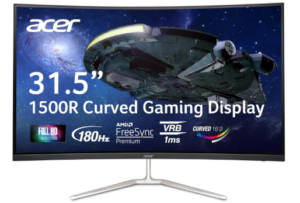
The Acer Nitro 31.5 inch earns its place among the best Curved Gaming Monitors under 250 with a large curved display that makes gameplay feel more immersive. The 1500R curve helps bring more of the screen into view, which works especially well for racing games, shooters, and open world titles.
The 31.5 inch screen is one of its biggest strengths. It gives you plenty of room for gaming, streaming, and everyday use, making the monitor practical beyond play. If you like a larger display, this size adds a lot to the experience.
Performance is another area where this monitor delivers. The 180Hz refresh rate keeps motion smooth, while the 1ms response time helps reduce blur during fast scenes. AMD FreeSync Premium also helps control tearing and stuttering, which makes gameplay feel more consistent.
Picture quality is solid for the price. The VA panel produces strong contrast, which helps darker scenes look deeper, while colors have enough vibrancy to keep games and videos looking lively. Full HD may not look as sharp as higher resolutions on a screen this size, but many buyers may find the speed and screen size worth that tradeoff.
The design is clean and straightforward. The slim bezels give it a modern look, while tilt adjustment helps with viewing comfort. VESA support is also useful if you prefer mounting the monitor for a cleaner setup.
Connectivity adds to its value. With DisplayPort and two HDMI ports, it is easy to connect multiple devices, whether you switch between a PC, console, or both.
What makes this monitor appealing is how well these features come together at this price. A large curved screen, fast refresh rate, and adaptive sync support give it a lot going for budget minded gamers.
Overall, this is a strong choice for gamers who want a larger curved monitor without overspending. It delivers a good balance of immersive gameplay, smooth performance, and solid value for the price.
Pros
- 180Hz refresh rate delivers smooth and responsive gameplay
- 1ms response time helps reduce motion blur in fast scenes
- AMD FreeSync Premium improves stability by reducing tearing and stutter
- Strong contrast from VA panel makes darker scenes more defined
- Clean design with slim bezels for a modern setup look
- HDMI and DisplayPort support for flexible connectivity
Cons
- Tilt adjustment only, no height or swivel customization
2) ArcticPro 34 inch 200Hz Curved Gaming Monitor
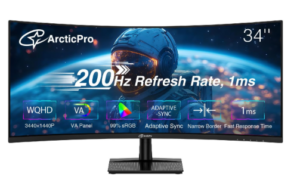
The ArcticPro 34 inch earns its place among the best Curved Gaming Monitors under 250 by offering an ultra wide curved display that immediately changes how games and media feel. The 3440 by 1440 WQHD resolution brings sharper detail and a wider field of view, which makes open world games, racing titles, and multitasking feel far more engaging compared to standard screens.
One of its strongest qualities is the balance between size and clarity. The 34 inch ultra wide format gives you extra horizontal space, which helps with immersion in games and also improves productivity when working with multiple windows. The added resolution ensures visuals stay crisp enough to take advantage of that expanded view.
Performance is where this monitor really pushes forward. The 200Hz refresh rate delivers very smooth motion, while the 1ms MPRT response time helps reduce blur during fast action. Combined with Low Blue Light support, the display is designed to stay comfortable during long gaming sessions without sacrificing clarity. Adaptive Sync also works in the background to reduce tearing and stuttering, keeping fast scenes stable and consistent.
Picture quality is another highlight. The VA panel provides strong contrast, helping darker scenes look deeper and more detailed. With wide color gamut support, including 99 percent sRGB and 85 percent NTSC, colors appear more vivid and balanced, which is useful for both gaming and creative work. The 178 degree viewing angles ensure the image remains consistent even when you are not sitting directly in front of the screen.
The design keeps things modern and practical. The three sided frameless look gives it a clean appearance, making it easier to focus on the display itself. It also includes tilt adjustment for basic positioning, along with VESA mount support if you prefer a wall or arm setup for better ergonomics.
Pros
- WQHD resolution delivers sharp and detailed visuals
- 200Hz refresh rate ensures very smooth gameplay
- 1ms MPRT response time reduces motion blur in fast scenes
- Adaptive Sync helps eliminate tearing and stuttering
- Strong contrast from VA panel improves depth in dark scenes
- Wide color gamut with 99 percent sRGB for richer colors
- VESA mount support and tilt adjustment for flexible setup options
Cons
- Higher resolution demands stronger hardware for best performance
3) SANSUI 32 Inch Curved 240Hz Gaming Monitor
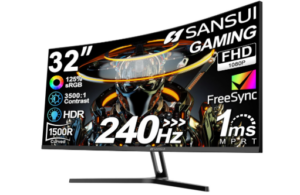
The SANSUI 32 inch curved gaming monitor is built for speed and immersion, offering a large display that pulls you into fast paced gameplay. The 1500R curved screen helps wrap visuals around your field of view, making racing games, shooters, and action titles feel more engaging and responsive.
Performance is where this monitor really pushes its appeal. The 240Hz refresh rate delivers exceptionally smooth motion, which is especially useful in competitive gaming where fast reactions matter. The 1ms MPRT response time helps keep movement sharp with reduced blur, even during intense scenes. FreeSync technology works alongside this to minimize screen tearing and stuttering, while anti flicker and low blue light features help reduce eye strain during long sessions.
This model fits well within the category of best Curved Gaming Monitors under 250 because it delivers very high refresh rate performance on a large curved display without moving into higher price brackets. The Full HD resolution also helps ensure that most mid range gaming setups can reach high frame rates more easily, allowing users to take full advantage of the 240Hz capability.
Color performance is another strong area. With 125 percent sRGB coverage and 16.7 million display colors, visuals appear more vibrant and lively. A 300 nits brightness level combined with HDR support adds more depth to highlights and shadows, while the 3500 to 1 contrast ratio improves the richness of darker scenes. The 178 degree viewing angles help maintain consistent image quality even when viewed from different positions.
The design is simple but functional. The 32 inch curved panel with 1500R curvature enhances immersion, while tilt adjustment from minus 5 to 15 degrees allows for basic positioning comfort. VESA mount support gives more flexibility for setup customization. Connectivity includes HDMI and DisplayPort 1.4, both supporting up to 240Hz, along with an earphone jack. The package also includes a metal stand, power adapter, DisplayPort cable, and user manual, though it does not come with built in speakers.
Pros
- Extremely high 240Hz refresh rate for smooth gameplay
- FreeSync support helps reduce tearing and stuttering
- Strong color reproduction with 125 percent sRGB coverage
- HDR support improves contrast and detail depth
- Wide viewing angles maintain consistent visuals
- VESA mount compatibility for flexible setup options
- Includes DisplayPort cable in the box
Cons
- No built in speakers
4) Sceptre 34-Inch Curved Ultrawide Monitor
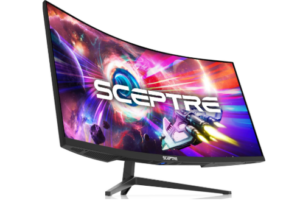
The Sceptre 34 inch curved ultrawide monitor is designed to deliver a wide and immersive viewing experience that changes how games and multitasking feel. The 21:9 aspect ratio gives you significantly more horizontal space compared to a standard display, making open world games feel broader and work setups feel more efficient.
With a 3440 x 1440 WQHD resolution, image clarity is noticeably sharper than standard Full HD screens. This higher pixel count allows details to appear more refined, which improves both gaming visuals and productivity tasks such as editing, browsing, or working with multiple windows side by side.
Performance is also well supported for gaming. The monitor features up to a 165Hz refresh rate paired with a 1ms MPRT response time, which helps keep fast motion smooth and reduces blur during action heavy scenes. AMD FreeSync Premium support further enhances gameplay by minimizing screen tearing and stuttering, creating a more stable visual experience during fast paced movement.
The ultrawide format is one of the most practical features. It offers around 30 percent more screen space compared to conventional monitors, which makes multitasking easier and gaming more immersive. The 1500R curvature also helps wrap the display slightly into your field of view, improving engagement without feeling overwhelming.
Visual presentation is complemented by a modern design. The luminous backcover lighting adds a subtle LED glow to the rear of the monitor, giving it a more stylish and contemporary appearance, especially in darker setups. Connectivity is also well covered with two HDMI ports, two DisplayPort inputs, and an audio out option, giving flexibility for multiple devices.
Pros
- WQHD resolution delivers sharp and detailed visuals
- 165Hz refresh rate supports smooth gaming performance
- 1ms MPRT response time reduces motion blur
- AMD FreeSync Premium helps eliminate tearing and stuttering
- 1500R curvature improves immersion
- Luminous backlighting adds a modern design touch
- Multiple HDMI and DisplayPort connections for flexibility
Cons
- Requires more desk space due to wide design
5) LG 32G600A-B 32-inch Curved Gaming Monitor
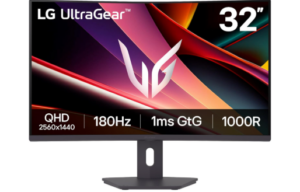
The LG 32G600A-B UltraGear earns its place among the best Curved Gaming Monitors under 250 by offering a large, immersive display built for smooth performance and sharper visuals. The 32 inch QHD curved screen with a 1000R curvature pulls you deeper into gameplay, making everything feel more engaging whether you are playing fast shooters, racing games, or exploring open worlds.
The QHD resolution at 2560 by 1440 brings a clear upgrade in detail compared to Full HD. Images look sharper, textures feel more refined, and the extra screen space makes multitasking easier. It is the kind of display that balances gaming and productivity without feeling limiting in either direction.
Performance is where this monitor really shows its strength. The 180Hz refresh rate keeps motion fluid, while the 1ms GtG response time helps fast scenes stay sharp and controlled. AMD FreeSync support adds stability by reducing screen tearing and stuttering, especially during fast paced gameplay or changing frame rates.
Color and visual quality are also well handled. HDR10 support adds depth to highlights and shadows, while up to 99 percent sRGB coverage keeps colors rich and consistent. Combined with a VA panel, the contrast is strong enough to make darker scenes feel more detailed and immersive.
Gaming tools included in the monitor add practical value. Dynamic Action Sync helps reduce input lag so reactions feel faster. Black Stabilizer improves visibility in dark scenes, making hidden enemies easier to spot. The Crosshair feature adds a fixed aiming point that can help with precision in shooter games.
The design is clean and functional. A narrow bezel build keeps the focus on the screen, while the stand allows height, tilt, and swivel adjustments for a more comfortable setup. Connectivity includes HDMI, DisplayPort, and a headphone jack, giving you flexible options for different devices.
Pros
- 32 inch QHD curved display delivers sharp and immersive visuals
- 1000R curvature creates a strong sense of depth and engagement
- 180Hz refresh rate ensures smooth and fluid gameplay
- 1ms GtG response time reduces motion blur in fast action scenes
- AMD FreeSync helps eliminate tearing and stuttering
- Up to 99 percent sRGB with HDR10 for vibrant and balanced colors
- Fully adjustable stand with height, tilt, and swivel support
Cons
- VA panel may show slower dark scene transitions compared to IPS
6) Samsung 27-Inch Odyssey Curved Gaming Monitor
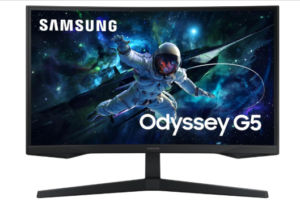
The Samsung Odyssey G55C is built to deliver a more immersive and responsive gaming experience, especially for players who want sharper visuals and faster motion handling in a curved display. The 27 inch QHD panel brings a noticeable upgrade in clarity compared to Full HD, with 1.7 times the pixel density that makes details sharper and more defined. This added resolution helps games feel more realistic and gives you extra screen space for better visibility during gameplay.
The 1000R curvature is one of the most engaging parts of this monitor. It naturally pulls the screen around your field of view, helping you feel more connected to what is happening on screen. Whether you are exploring large environments or competing in fast paced matches, the curve helps create a more focused and absorbing experience.
This model fits strongly within the category of best Curved Gaming Monitors under 250 because it combines high resolution, fast refresh performance, and strong immersion at a budget friendly level. It is designed to handle both competitive gaming and cinematic visuals without feeling limited in either direction.
Performance is smooth and responsive thanks to the 165Hz refresh rate, which reduces lag and keeps motion fluid during fast scenes. The 1ms MPRT response time helps minimize blur, making quick movements and sharp turns easier to track. AMD FreeSync support ensures that the monitor stays in sync with your graphics card, reducing screen tearing and creating a more stable visual experience.
Visual quality is also impressive for its class. HDR10 support enhances contrast and brings out more detail in both bright and dark areas of the screen. Deep blacks and brighter highlights help scenes feel more dynamic, while the overall color range gives games a more vibrant and realistic look.
Comfort is also considered in the design. Eye Saver Mode reduces blue light exposure, which helps ease eye strain during longer gaming sessions. Flicker reduction further improves viewing comfort, allowing you to focus for longer periods without fatigue building up as quickly.
Pros
- QHD resolution delivers sharp and detailed visuals
- 1000R curvature creates strong immersion and wider field of view
- 165Hz refresh rate ensures smooth gameplay
- 1ms MPRT response time reduces motion blur
- AMD FreeSync helps eliminate tearing and stuttering
- HDR10 improves contrast and color depth
- Eye Saver Mode helps reduce eye strain during long sessions
- Includes HDMI and DisplayPort cables in the box
Cons
- Requires decent GPU power to fully benefit from QHD at high refresh rates
Next read: 10 Best 27 Inch Full HD Monitors