
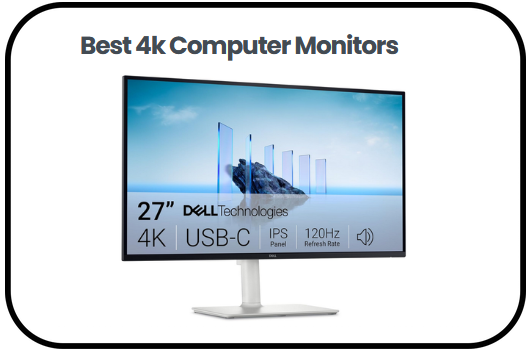
If you are looking to upgrade your screen experience, I have put together this comprehensive guide on the best 4K Computer Monitors to help you make the right choice.
Having explored the market thoroughly, I can confidently say that 4K monitors are a game changer whether you are a creative professional who needs accurate color reproduction, a gamer chasing fluid and immersive visuals or someone who simply wants a sharper and more comfortable screen for everyday use. With four times the pixel count of Full HD, these monitors deliver outstanding clarity, richer detail, and more screen space for multitasking.
In this guide, I will walk you through the standout features that make each monitor worth considering, share my top picks across a range of sizes and budgets, break down a practical buying guide covering everything from panel types and refresh rates to HDR support and ergonomics, and wrap things up with answers to the most frequently asked questions.
By the end, you will have everything you need to find the perfect 4K monitor for your setup and budget.
Overview of the Best 4k Computer Monitors:
- Samsung 37″ Odyssey G7 4K UHD Monitor — Best Overall
- SANSUI 27″ 4K Gaming Monitor — Best for Gaming Versatility
- Dell 27 Plus 4K Monitor — Best for Work and Everyday Use
- Gawfolk 32 Inch 4K UHD Computer Monitor — Best Budget Option
- LG 27UP650K-W 27 Inch Ultrafine UHD Monitor — Best for Color Accuracy
- Samsung 32″ UJ59 Series 4K UHD Monitor — Best for Multitasking
- LG 32UR500K-B Ultrafine 32 Inch Monitor — Best for Entertainment
Best 4k Computer Monitors
1) Samsung 37” Odyssey G7 4K UHD Monitor
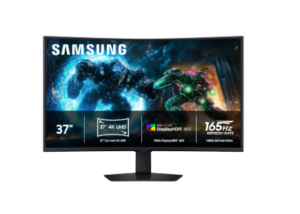
If you’re searching for the best 4K Computer Monitors, the Samsung 37” Odyssey G7 (G75F) 4K UHD Monitor is designed for immersive gaming and high-performance use. It combines sharp visuals with a curved display that enhances depth without feeling excessive.
The 37 inch 1000R curved screen wraps naturally around the field of view, creating a more engaging experience during gameplay and media consumption. The 4K UHD resolution delivers crisp detail, while VESA DisplayHDR 600 improves contrast so darker scenes remain clear instead of appearing flat.
Performance remains smooth and responsive. A 165Hz refresh rate keeps motion fluid, while the 1ms response time helps reduce motion blur. AMD FreeSync Premium Pro minimizes screen tearing and stutter, allowing for more consistent gameplay.
This monitor also supports everyday usability. Auto Source Switch Plus simplifies switching between connected devices, and the adjustable stand improves comfort during long sessions. CoreSync and CoreLighting Plus add ambient lighting that extends on-screen colors into the surrounding space.
Pros
- Large 37 inch curved display enhances immersion
- Sharp 4K resolution with clear detail
- Smooth performance with 165Hz refresh rate
- Fast response time reduces motion blur
- Strong contrast with DisplayHDR 600
- FreeSync Premium Pro reduces screen tearing
Cons
- The aggressive curve may require adjustment for some users
2) SANSUI 27″ 4K Gaming Monitor
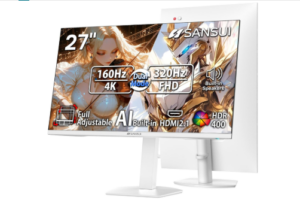
The SANSUI 27″ 4K Gaming Monitor is built for users who need flexibility between high resolution and high refresh rate performance. It is a practical option for setups that switch between gaming, streaming, and everyday tasks.
A key feature is the dual mode display, which allows switching between 4K at up to 160Hz or Full HD at 320Hz. This makes it easier to prioritize visual clarity or speed depending on the situation. The Fast IPS panel maintains consistent color, while HDR400 and solid brightness levels help improve image quality.
Among the best 4K Computer Monitors, this model stands out for its versatility. A 1ms response time keeps motion clean, and FreeSync Premium reduces screen tearing during fast-paced gameplay. Built-in features such as AI crosshair, sniper scope, and night vision support better visibility in competitive scenarios.
Comfort and usability are also well handled. Wide viewing angles maintain image quality from different positions, and eye care features help reduce strain during extended use. The adjustable stand supports height, tilt, and rotation for better ergonomics.
Pros
- Smooth gameplay with high refresh rates and fast response time
- Good color output with HDR support
- FreeSync Premium reduces screen tearing
- Flexible for both gaming and everyday use
Cons
- Performance depends heavily on system hardware
3) Dell 27 Plus 4K Monitor
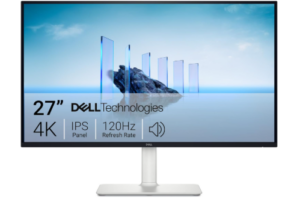
Among the best 4K Computer Monitors, the Dell 27 Plus 4K Monitor is a strong choice for users who want a balance between clarity, comfort, and everyday performance. It fits naturally into both work and entertainment environments.
The 27 inch display delivers sharp 4K visuals with consistent color accuracy. With 99 percent sRGB coverage, images appear natural and detailed. HDR support and a solid contrast ratio add depth, making content look more lifelike across different use cases.
Performance remains smooth for most tasks. The refresh rate reaches up to 120Hz, and AMD FreeSync Premium helps reduce screen tearing. Motion appears clean, which is useful for both casual gaming and video playback. ComfortView Plus reduces blue light exposure, supporting longer viewing sessions.
The design focuses on simplicity and usability. Ultra thin bezels create a clean, modern look, while built-in speakers provide convenient audio for daily use. Accessible ports and a practical stand make setup straightforward.
Pros
- Sharp 4K resolution with accurate color reproduction
- Smooth performance with 120Hz refresh rate
- FreeSync Premium reduces screen tearing
- Eye comfort features support extended use
- Clean design with useful built-in speakers
Cons
- Not ideal for competitive high refresh rate gaming
4) Gawfolk 32 Inch 4K UHD Computer Monitor
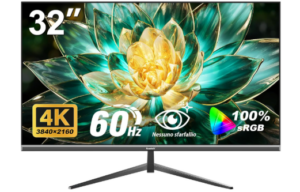
The Gawfolk 32 Inch 4K UHD Computer Monitor is designed for users who want a larger screen with strong visual clarity for both work and entertainment. It focuses on delivering detailed images and consistent color without unnecessary complexity.
The 32 inch display uses a 4K UHD resolution of 3840 by 2160, offering four times the pixel count of Full HD. This results in sharper visuals and more defined details across content. With 8 bit color depth, support for 16.7 million colors, and 100 percent sRGB coverage, images appear vivid and natural. A 3500 to 1 contrast ratio also improves depth, allowing darker areas to remain clear instead of appearing flat.
The VA panel maintains stable color output and supports wide viewing angles up to 178 degrees. This helps preserve image quality from different positions, making it suitable for both individual use and shared viewing. The larger screen size also improves multitasking by providing more space for multiple windows and detailed work.
Comfort features support extended use. Low blue light mode helps reduce eye strain, while flicker free technology using DC dimming creates a more stable viewing experience. This makes it suitable for long work sessions, streaming, or general everyday use.
The monitor also supports wall mounting with a 100 by 100 millimeter pattern, allowing more flexibility in setup and helping reduce desk clutter. DisplayPort and HDMI connectivity ensure compatibility with a wide range of devices, making it easy to integrate into different setups. These features make it a practical addition when considering the best 4K Computer Monitors.
Pros
- Sharp 4K resolution with clear and detailed visuals
- Strong contrast ratio improves depth and clarity
- Accurate color with full sRGB coverage
- Wide viewing angles maintain consistent image quality
Cons
- Not suitable for high refresh rate competitive gaming
5) LG 27UP650K-W 27 Inch Ultrafine UHD Monitor
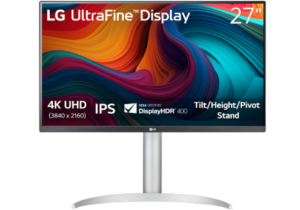
The LG 27UP650K-W 27 inch Ultrafine 4K UHD Monitor is built for users who prioritize color accuracy, sharp detail, and a clean viewing experience across work and entertainment. It offers a balanced combination of visual quality and practical features, making it suitable for creative tasks, streaming, and everyday use.
The 27 inch IPS display delivers 4K UHD resolution at 3840 by 2160, producing clear images and refined detail. With up to 95 percent DCI P3 color gamut, the screen presents a wider range of colors, making visuals appear more vibrant and lifelike. This level of color performance is especially useful for content creation, photo editing, and media consumption where accuracy matters.
HDR support with VESA DisplayHDR 400 enhances brightness and contrast, allowing content to appear more dynamic. Highlights look brighter while darker areas retain better visibility, creating a more immersive viewing experience. The IPS panel also maintains consistent color and clarity across wide viewing angles, making it reliable from different positions.
For gaming and fast moving content, features such as Dynamic Action Sync help reduce input lag, keeping on screen actions more responsive. Black Stabilizer improves visibility in darker scenes, which can be useful during gameplay or when watching dimly lit content.
The Switch app adds flexibility by allowing the screen to be divided into multiple sections, supporting multitasking across work, streaming, and communication. It also simplifies navigation between different inputs and features, helping streamline daily use.
Comfort is supported through an ergonomic stand with height, tilt, and pivot adjustments, making it easier to find a suitable viewing position. Reader Mode and flicker safe technology also help reduce eye strain during extended sessions.
Overall, this monitor is a strong option for users who want reliable color performance, practical multitasking features, and a comfortable viewing setup when exploring the best 4K Computer Monitors.
Pros
- Sharp 4K resolution with clear and detailed visuals
- Wide color coverage with up to 95 percent DCI P3
- HDR support improves brightness and contrast
- IPS panel maintains consistent color across wide angles
Cons
- 60Hz refresh rate limits high performance gaming
6) SAMSUNG 32″ UJ59 Series 4K UHD Monitor
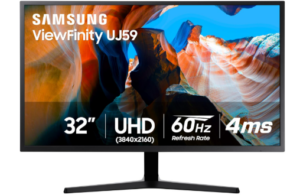
The SAMSUNG 32″ UJ59 Series 4K UHD Monitor is designed for users who want a larger screen with strong multitasking capability and detailed visuals for both work and entertainment. It provides a wide viewing area and sharp image quality, making it suitable for productivity, media consumption, and casual gaming.
The 32 inch display delivers 4K UHD resolution at 3840 by 2160, offering four times the pixel count of Full HD. This creates more screen space for working with multiple windows while maintaining clear and detailed visuals. Supporting over one billion shades of color, the monitor produces more realistic and accurate color representation, which is useful for photo editing, video playback, and general content viewing.
When exploring the best 4K Computer Monitors, this model offers a balance between visual quality and practical features. Samsung’s UHD upscaling technology improves lower resolution content by enhancing detail and clarity, allowing HD and Full HD media to appear closer to 4K quality. This makes it more versatile when working with different types of content.
Gaming performance is supported through AMD FreeSync, which helps reduce screen tearing and stutter by synchronizing the monitor with the graphics card. Low Input Lag Mode improves responsiveness, making on screen actions feel more immediate. Game Mode enhances contrast in darker scenes, helping improve visibility and making it easier to spot details during gameplay.
Multitasking is another strong aspect of this monitor. Picture by Picture allows two devices to be connected and displayed simultaneously while maintaining their original quality. Picture in Picture adds flexibility by letting a second input be resized and positioned anywhere on the screen. This setup is useful for users managing multiple workflows or combining work and entertainment on one display.
The design features slim bezels and a matte black finish that fits well into most setups. The Y shaped stand provides stable support while maintaining a clean and modern look on the desk.
Pros
- Sharp 4K resolution with clear detail
- Wide color range with over one billion shades
- UHD upscaling improves lower resolution content
- FreeSync reduces screen tearing during gameplay
Cons
- No advanced HDR support compared to newer models
7) LG 32UR500K-B Ultrafine 32 Inch Monitor
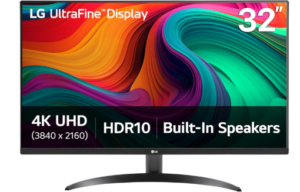
The LG 32UR500K-B Ultrafine 32 inch 4K UHD Monitor is built for users who want a large display with strong color performance and practical features for both work and entertainment. It combines sharp visuals, built in audio, and simple usability, making it suitable for everyday setups without adding unnecessary complexity.
The 32 inch display delivers 4K UHD resolution at 3840 by 2160, producing clear images with refined detail. With up to 90 percent DCI P3 color gamut, visuals appear vibrant and more lifelike across different types of content. This makes it useful for streaming, creative work, and general media use where color quality plays an important role. HDR10 support further enhances brightness and contrast, allowing highlights and darker areas to appear more balanced.
Built in stereo speakers with Waves MaxxAudio add another layer of convenience. Audio feels fuller and more immersive compared to standard monitor speakers, making it easier to watch content or play games without relying on external sound systems.
Gaming and responsiveness are supported through Dynamic Action Sync, which reduces input lag for smoother interaction during fast scenes. Black Stabilizer improves visibility in darker areas, helping reveal details that might otherwise be difficult to see. These features make the monitor suitable for casual gaming alongside everyday tasks.
OnScreen Control improves usability by allowing the display to be customized with a few clicks. The screen can be divided into multiple sections for multitasking, making it easier to manage different applications at once. This adds flexibility for both productivity and entertainment setups.
The ergonomic stand supports tilt adjustment, helping users find a comfortable viewing position. The overall design remains simple and functional, fitting well into different desk setups. These combined features make it a reliable option when considering the best 4K Computer Monitors.
Pros
- HDR10 support improves contrast and brightness
- Built in speakers provide better audio than standard monitors
- OnScreen Control allows easy workspace customization
- Gaming features improve visibility and responsiveness
Cons
- Limited ergonomic adjustments compared to premium models
Read more: 10 Best HP Touchscreen Laptops
Advantages of using 4k Computer Monitors
Sharper Image Quality and Detail
One of the main advantages of using the best 4K Computer Monitors is the level of detail they provide. With a resolution of 3840 by 2160, these displays offer four times the pixel count of Full HD. This results in clearer text, sharper images, and more refined visuals, making everything from documents to high resolution media appear more precise and easier to view.
Improved Productivity and Multitasking
4K monitors provide more screen space, which allows multiple windows and applications to be used at the same time without feeling cramped. This makes it easier to manage workflows, compare documents, edit content, and handle complex tasks efficiently. The additional workspace reduces the need to constantly switch between tabs, improving overall productivity.
Better Color Accuracy and Visual Quality
Many 4K monitors support wide color gamuts such as sRGB or DCI P3, allowing them to display more accurate and vibrant colors. This is especially useful for creative work like photo editing, video production, and graphic design. Even for everyday use, improved color quality enhances the viewing experience for movies, streaming, and browsing.
Enhanced Viewing Experience for Entertainment
Watching movies, sports, and shows on a 4K monitor feels more immersive due to the higher resolution and improved clarity. Details in scenes become more noticeable, and larger screen sizes further enhance the experience. Features like HDR support can also improve contrast and brightness, making content appear more dynamic.
Smoother Performance for Gaming
Many of the best 4K Computer Monitors include features such as higher refresh rates, low response times, and adaptive sync technologies. These features help reduce motion blur, screen tearing, and input lag. As a result, gameplay feels smoother and more responsive, which is important for both casual and competitive gaming.
Greater Flexibility and Versatility
4K monitors are designed to handle a wide range of uses, from professional work to entertainment and gaming. Features like multiple input ports, screen splitting, and picture by picture modes allow users to connect different devices and manage multiple tasks on a single display. This flexibility makes them suitable for different setups and environments.
Improved Eye Comfort for Long Use
Many modern 4K monitors include eye care technologies such as low blue light modes and flicker free displays. These features help reduce eye strain during extended use, making them more comfortable for long working hours or extended viewing sessions. Adjustable stands and ergonomic designs also contribute to better posture and viewing comfort.
Factors to Consider when Choosing the Best 4k Computer Monitors
Screen Size and Resolution Balance
Screen size plays a major role in how a 4K monitor performs in real use. While all 4K monitors offer the same resolution, the size of the screen affects how sharp and comfortable the display feels. Larger screens provide more workspace and are better for multitasking, while smaller screens maintain higher pixel density, which can make text and images appear sharper. Choosing the right balance depends on desk space and how the monitor will be used daily.
Panel Type and Viewing Angles
The type of panel used in a monitor affects color quality, contrast, and viewing angles. IPS panels are known for consistent colors and wide viewing angles, making them suitable for creative work and shared viewing. VA panels typically offer deeper contrast, which improves dark scenes and enhances media consumption. Understanding these differences helps in selecting a monitor that matches specific visual preferences and use cases.
Refresh Rate and Response Time
Refresh rate and response time are important for how smooth motion appears on screen. Higher refresh rates provide smoother visuals, especially during fast moving content such as gaming or scrolling. Response time affects how quickly pixels change, which impacts motion clarity. For general use, standard refresh rates are sufficient, while higher rates are more beneficial for gaming and dynamic content.
Color Accuracy and Gamut Coverage
Color performance is essential for tasks that rely on visual precision. Monitors with higher color accuracy and wider color gamut coverage can display more realistic and vibrant colors. This is particularly important for photo editing, video production, and design work. Even for everyday use, better color reproduction improves the overall viewing experience.
HDR Support and Brightness Levels
High Dynamic Range enhances contrast and brightness, allowing a wider range of light and dark areas to be displayed. This improves depth and realism in supported content. However, HDR performance varies between monitors depending on brightness levels and panel capabilities. Considering HDR support is useful for users who watch high quality media or want more dynamic visuals.
Connectivity and Additional Features
The range of available ports and extra features can affect how easily a monitor fits into a setup. Multiple HDMI or DisplayPort inputs allow connection to different devices, while features like screen splitting and picture in picture improve multitasking. Some monitors also include built in speakers or software controls that enhance convenience and usability.
Ergonomics and Eye Comfort
Comfort is important for long term use, especially for work or extended viewing sessions. Adjustable stands that support height, tilt, or pivot help create a better viewing position. Eye care features such as low blue light modes and flicker free technology reduce strain and make prolonged use more comfortable. These factors contribute to both productivity and overall user experience.
Frequently Asked Questions (FAQs)
Are the best 4K Computer Monitors worth it for everyday use?
Yes, the best 4K Computer Monitors are worth it for everyday use, especially for users who spend long hours in front of a screen. The higher resolution improves text clarity and reduces strain, while the extra screen space allows for better multitasking. Everyday activities such as browsing, working on documents, and streaming content feel more comfortable and visually refined.
What size is best for a 4K monitor?
The best size depends on how the monitor will be used and the available desk space. A 27 inch display offers a sharp image with high pixel density, making it ideal for close up work. A 32 inch or larger screen provides more workspace and a more immersive experience, which is useful for multitasking, media consumption, and creative tasks.
Is 60Hz enough for a 4K monitor?
A 60Hz refresh rate is sufficient for general use, including office work, browsing, and watching videos. It provides smooth performance for most everyday tasks. However, users who focus on gaming or fast moving content may benefit from higher refresh rates for smoother motion and better responsiveness.
What is the difference between IPS and VA panels?
IPS panels provide better color accuracy and wider viewing angles, making them suitable for creative work and shared viewing. VA panels offer stronger contrast, which enhances depth and improves the experience for watching movies or general use. The better option depends on whether color precision or contrast is the priority.
Conclusion
Looking back at everything covered in this guide, one thing stands out clearly and that is the fact that the best 4K Computer Monitors deliver far more value than most people initially expect.
Whether you are a gamer looking for smooth and responsive visuals, a creative professional who needs precise and accurate color reproduction, or an everyday user who simply wants a sharper and more comfortable viewing experience, there is a 4K monitor out there that fits your needs perfectly.
The combination of stunning resolution, improved color accuracy, faster refresh rates, and thoughtful eye care features makes these monitors a worthy upgrade for any setup. Beyond just the visual benefits, the added screen space and multitasking capabilities make daily work and entertainment feel more organized and enjoyable. The buying guide and frequently asked questions covered in this article should give you a clear picture of what to look for before making your final decision.
At the end of the day, a great 4K monitor is not just a display, it is an investment in your productivity, comfort, and overall enjoyment of everything you do on screen. I hope this guide has made your search easier and helped you find the best 4K Computer Monitor that truly meets your expectations.